
|
Do it yourself
| |||
| ||||



How to Disable the Honda City Anti-Theft Alarm?
Model: Honda City
MK 6, GM9, GM4, GM6, GM8, GM5
- Years:
2014, 2015, 2016, 2017, 2018, 2019, 2020, 2021, 2022, 2023
Video tutorial
To disable the anti-theft alarm of the Honda City, turn on the instrument panel by inserting the ignition key into the ignition switch: next to the steering wheel, you will find the button located under the alarm light. To deactivate it, enter the specific code provided at the time of purchase: press the button as many times as the first digit, then as many times as the second, and so on until the fourth digit. Once the code is entered, you will notice that the alarm is deactivated.
Updated on 21 September 2026 by ScegliAuto
Related tutorials
Honda City
(2014-2023 /
MK 6, GM9, GM4, GM6, GM8, GM5)
Today, learn how simple and quick it is to disable the alarm of the Honda City. First, get inside the vehicle to turn on the instrument panel. Next, …
Honda City
(2002-2008 /
GD6, GD9, GD7, GD8, GE4, GE1)
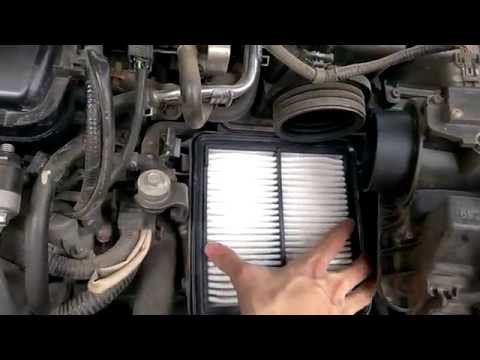
In this video, you will see how to change the air filter on a Honda City. In the Honda City, the air filter box is located next to the battery. Use a…

Honda City
(2014-2023 /
MK 6, GM9, GM4, GM6, GM8, GM5)
To replace the front headlight bulb in a Honda City, open the hood to access the rear of the headlight corresponding to the bulb that needs replaceme…
Other guides you may be interested in
|
How to Remove the Rear Seat of a Hyundai Tucson?
To remove the rear seat of a Hyundai Tucson, follow these steps. Start by moving the front seats to their most forward position to gain space. Next, locate the release lever on the underside of the rear seat, near the floor. Press this lever down while pulling the seat upwards to unlock it from the anchor pins. Once unlocked, tilt the seat upwards and forwards to remove it from its position. Repeat this process for both sides of the rear seat. Be careful of any electrical cables or components that may be connected to the seat during removal. Once the rear seat is removed, the disassembly is complete. by ScegliAuto More videos
|
|
For advertising on this site Write to info@scegliauto.com
ScegliAuto is not responsible for any inaccuracy of the data in the lists. To report any inaccuracy or your business (if you own the business in question), please write to info@scegliauto.com
Number of seconds to generate the page: 0.078
(c) ScegliAuto 2026 - info@scegliauto.com - Privacy policy VAT number: IT01247470535 |
