
|
Do it yourself
| |||
| ||||



Video tutorial
Let's see how to change the time on the clock of a Jaguar XJ with the Touch Pro or InControl Touch infotainment screen. Turn on the display and go to the main menu; look for the "settings" icon and select "time and date". Adjust the hours and minutes using the +/– buttons or the arrows on the screen and confirm with "done" or "ok". If the system is "Touch Pro", disable the automatic setting to adjust manually and set the hours and minutes, then save. If you still have the InControl Touch system, press the "setup" button on the physical panel below the screen, select "system", and choose "time & date" to adjust manually.
Posted on 7 June 2026 by ScegliAuto
Related tutorials
Jaguar Xj
(2009-2019 /
MK 9, X351)
If you want to change the battery in your Jaguar XJ key, first read the procedure described below carefully, then follow the steps. First, purchase a…
Jaguar Xj
(2009-2019 /
MK 9, X351)
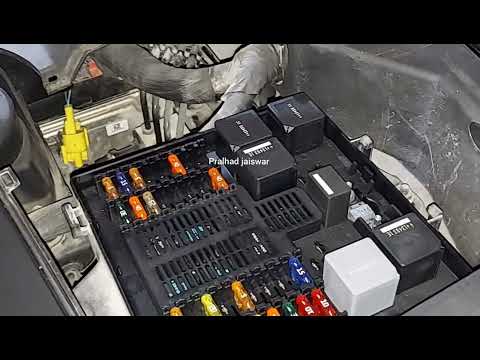
With this mini guide, you will finally be able to find the main fuse box on your Jaguar XJ (2009-2019). Here’s how to do it. First, ensure that the c…

Jaguar Xj
(2009-2019 /
MK 9, X351)
Unlike many other cars, the fuse box on the Jaguar XJ is not located inside the dashboard or under the bonnet. Below, we will discover the steps to l…
Other guides you may be interested in
|
How to Remove the Rear Seat of a Hyundai Tucson?
To remove the rear seat of a Hyundai Tucson, follow these steps. Start by moving the front seats to their most forward position to gain space. Next, locate the release lever on the underside of the rear seat, near the floor. Press this lever down while pulling the seat upwards to unlock it from the anchor pins. Once unlocked, tilt the seat upwards and forwards to remove it from its position. Repeat this process for both sides of the rear seat. Be careful of any electrical cables or components that may be connected to the seat during removal. Once the rear seat is removed, the disassembly is complete. by ScegliAuto More videos
|
|
For advertising on this site Write to info@scegliauto.com
ScegliAuto is not responsible for any inaccuracy of the data in the lists. To report any inaccuracy or your business (if you own the business in question), please write to info@scegliauto.com
Number of seconds to generate the page: 0.055
(c) ScegliAuto 2026 - info@scegliauto.com - Privacy policy VAT number: IT01247470535 |
