
|
Do it yourself
| |||
| ||||


How to Replace the Battery in a Land Rover Discovery Sport?
Model: Land Rover Discovery
L462, Discovery 5, MK 5
- Years 2017-2024
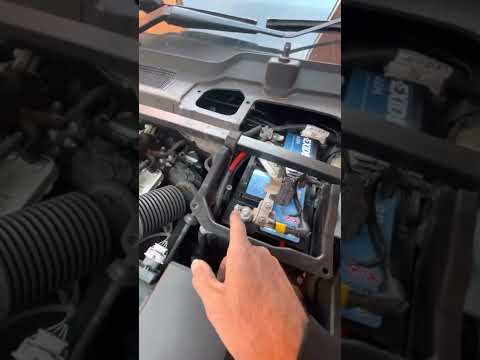
In this tutorial, you will see how to replace the battery in a Land Rover Discovery Sport, a very simple and quick operation. First, ensure the key is not in the ignition for safety. Then, open the hood, remove the battery cover, and, by unscrewing all the indicated screws, take off the cross reinforcement bar. Next, loosen the nuts on both terminals with a 10mm wrench, disconnect them starting with the negative terminal, and temporarily remove the air filter box. At this point, just unscrew the mounting bolts, pull out the battery, and install the replacement.
Updated on 22 August 2026 by ScegliAuto
Video tutorial
Related tutorials
Land Rover Discovery
(2010-2016 /
Discovery 4, MK 4, LR4)
If the remote control of your Land Rover Discovery Sport suddenly stops working and you want to change the battery inside it, just follow the steps d…
Land Rover Discovery
(2010-2016 /
Discovery 4, MK 4, LR4)
In this video, you can see where the battery is located in the Land Rover Discovery Sport and how to proceed if you need to replace it. As shown, it …

Land Rover Discovery
(2010-2016 /
Discovery 4, MK 4, LR4)
If the AdBlue warning light comes on in the instrument panel of our Land Rover Discovery Sport, it means that the fluid in the anti-pollution system …
Other guides you may be interested in
|
How to Replace the Cabin Filter on the Opel Grandland X
If you own an Opel Grandland X and want to know the steps to replace the cabin air filter, carefully read the following guide and follow the described steps. First, enter the vehicle and go to the passenger side. Then, locate the box containing the air filter in the lower side area of the dashboard. Remove the cover of the box and finally replace the old filter with the new one. Refit the cover, and you are done. by ScegliAuto More videos
|
|
For advertising on this site Write to info@scegliauto.com
ScegliAuto is not responsible for any inaccuracy of the data in the lists. To report any inaccuracy or your business (if you own the business in question), please write to info@scegliauto.com
Number of seconds to generate the page: 0.179
(c) ScegliAuto 2026 - info@scegliauto.com - Privacy policy VAT number: IT01247470535 |
