
|
Do it yourself
| |||
| ||||


How to Replace the Key Battery on a Mazda CX-50?
Model: Mazda Mazda Various
Video tutorial
To replace the key battery on a Mazda CX-50, start by taking the key and locating the small release button on the side of the key. Press it to extract the mechanical key. Once the mechanical key is removed, you will notice a slot or opening point on the remote casing. Use a flathead screwdriver or a similar tool to gently pry open the casing at the slot and separate the two halves of the remote casing. When the casing is open, you will find the battery inside. Note the orientation of the battery to ensure you insert the new one the same way. Carefully remove the old battery and replace it with a new one of the same type, ensuring it is correctly positioned. Reassemble the remote casing by pressing the two halves together until you hear a click indicating it is securely closed. Finally, reinsert the mechanical key into the remote. Test the key to ensure it works correctly with the new battery. By following these steps, you will have successfully replaced the key battery on your Mazda CX-50.
Updated on 15 October 2026 by ScegliAuto
Related tutorials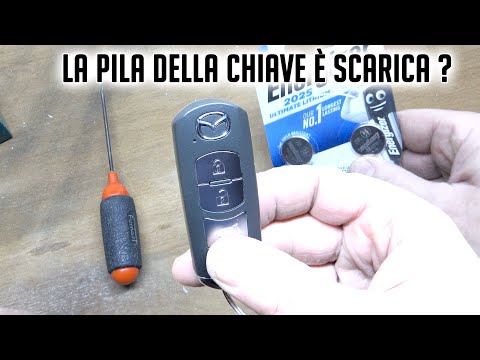
Mazda Mazda Various
When the key for a Mazda vehicle is low on battery, the vehicle alerts you through the instrument cluster indicating that the battery is nearly deple…

Mazda Mazda Various
Extract the manual key from the casing by slightly opening the clip on the back and pulling out the manual spare key as shown in the video. Use any f…

Mazda Mazda Various
In this guide for all Mazda CX-50 owners, you will find the procedure to replace the battery inside the car remote. First, completely disassemble the…
Other guides you may be interested in
|
How to Reset the Tyre Pressure Warning Light on the Jeep Renegade?
To reset the tyre pressure warning light on the Jeep Renegade, inflate the tyres until they reach the recommended pressure: this value is indicated on the sticker attached to the driver’s door pillar. Once the tyres are properly inflated, navigate through the menu that appears on the instrument cluster until you find the tyre pressure option. At this point, press and hold the OK button on the right side of the steering wheel to make the warning light disappear. by ScegliAuto More videos
|
|
For advertising on this site Write to info@scegliauto.com
ScegliAuto is not responsible for any inaccuracy of the data in the lists. To report any inaccuracy or your business (if you own the business in question), please write to info@scegliauto.com
Number of seconds to generate the page: 0.110
(c) ScegliAuto 2026 - info@scegliauto.com - Privacy policy VAT number: IT01247470535 |
