
|
Do it yourself
| |||
| ||||


How to reset the engine oil light on the 2019 Mini Cooper
Model: Mini Mini
F57, F56, F55, F54
- Years 2014-2023
If you want to manually reset the engine oil light of your 2019 Mini Cooper, simply follow all the following steps step by step. First, turn on the instrument panel and locate the "0.0" button inside the speedometer, then press and hold the button for a few seconds and release it as soon as the new screen appears. At this point, press the same button again and release it as soon as you are asked to confirm the reset of the oil light. Finally, press it one last time to complete the reset of the light.
Posted on 25 November 2024 by ScegliAuto
Video tutorial
Related tutorials
Mini
(2014-2023 /
F57, F56, F55, F54)
Like all cars, the Mini Cooper also has its maintenance program, detailed in the user manual. The oil change and oil filter replacement are essential…

Mini
(2017-2023 /
Countryman2, F60)
To manually reset the engine oil light of your Mini Cooper, you must follow these steps. First, go inside the car and sit in the driver's seat, then …

Mini
(2014-2023 /
F57, F56, F55, F54)
Manually resetting the engine oil light on your Mini Cooper is very simple and thanks to the procedure described in the following guide, you will hav…
Other guides you may be interested in
|
How to Replace the Front Bumper of a Fiat Panda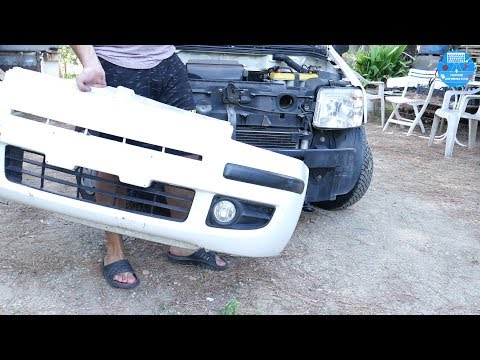
Start by releasing the bonnet from the latch to lift and secure it with the prop rod. This way, you can unscrew the screws securing the top part of the front bumper. Next, remove the screws securing the inner wing to the rear part of the bumper. Now, unscrew the screws anchoring the bottom part of the bumper to the lower body of the vehicle. Finally, extract the bumper and reverse the steps described for reassembling the various components. by ScegliAuto More videos
|

|
For advertising on this site Write to info@scegliauto.com
ScegliAuto is not responsible for any inaccuracy of the data in the lists. To report any inaccuracy or your business (if you own the business in question), please write to info@scegliauto.com
Number of seconds to generate the page: 0.087
(c) ScegliAuto 2026 - info@scegliauto.com - Privacy policy VAT number: IT01247470535 |
