
|
Do it yourself
| |||
| ||||


Reset the Mini Cooper service reminder
Model: Mini Mini
R56, R57, R55
- Years 2007-2014
Today we will discover the instructions that will allow us to reset the maintenance reminder for the engine oil change of the Mini Cooper, by resetting the service light on the instrument panel. First, we get into the car and turn on the ignition by turning the key to position one; we press the button located at the end of the left steering wheel lever until we reach the "set info" option, as shown in the video. At this point, we go to the engine oil change option and hold down the reset button to confirm and perform the final reset of the service reminder!
Posted on 21 April 2025 by ScegliAuto
Video tutorial
Related tutorials
Mini
(2014-2023 /
F57, F56, F55, F54)
The procedure for resetting the Service light that is shown on the instrument panel of the Mini Cooper involves connecting a diagnostic tool to the v…

Mini
(2014-2023 /
F57, F56, F55, F54)
In today's article, we will see how to reset the service light of the Mini Cooper. To perform the reset, first start the ignition without starting th…

Mini
(2001-2007 /
R52, R50, R53)
If the tire pressure warning light on your Mini Cooper R52 continues to stay on constantly on the instrument panel and you want to manually reset it,…
Other guides you may be interested in
|
How to Replace the Front Bumper of a Fiat Panda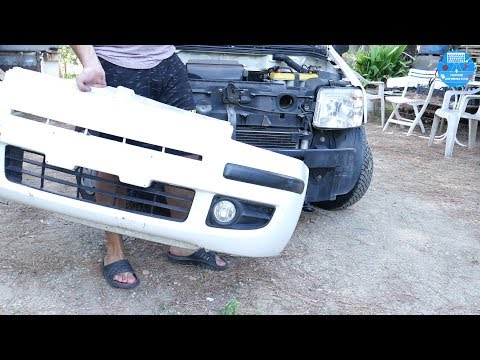
Start by releasing the bonnet from the latch to lift and secure it with the prop rod. This way, you can unscrew the screws securing the top part of the front bumper. Next, remove the screws securing the inner wing to the rear part of the bumper. Now, unscrew the screws anchoring the bottom part of the bumper to the lower body of the vehicle. Finally, extract the bumper and reverse the steps described for reassembling the various components. by ScegliAuto More videos
|

|
For advertising on this site Write to info@scegliauto.com
ScegliAuto is not responsible for any inaccuracy of the data in the lists. To report any inaccuracy or your business (if you own the business in question), please write to info@scegliauto.com
Number of seconds to generate the page: 0.136
(c) ScegliAuto 2026 - info@scegliauto.com - Privacy policy VAT number: IT01247470535 |
