
|
Do it yourself
| |||
| ||||


How to reset the oil life indicator of the Mini Cooper from the instrument panel.
Model: Mini Mini
R56, R55, R57
- Years 2007-2014
To reset the oil life indicator on the Mini Cooper, you only need to work from the central instrument panel, without using diagnostic tools. With the car stationary, turn the ignition to the "on" position, leaving the engine off. On the central tachometer, at the bottom, there is a display showing the mileage, and to the right, there is a small button that controls the onboard computer. Pressing this button cycles through the various screens until the display shows the symbol of the car on a lift, indicating the maintenance section. Continuing to use the same button, navigate to the screen with the icon of the oil can; when this is visible, hold the button down for a longer period. After a few seconds, the display will show the word "RESET," indicating that the system is ready to reset the oil change interval. Keep holding until the panel updates the data and shows the new remaining mileage along with the date of the next service. At this point, you can release the button and return to the normal screen: the oil change warning has been reset, and the Mini Cooper will record the new maintenance interval.
Posted on 29 November 2025 by ScegliAuto
Video tutorial
Related tutorials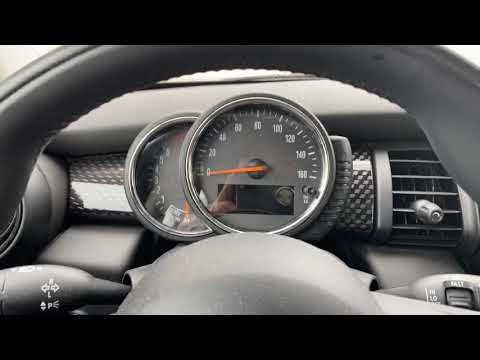
Mini
(2014-2023 /
F56, F57, F54, F55)
In today's guide, you will learn how to reset the service light for the regular maintenance oil change on a 2016 Mini Cooper S, fourth series. First,…

Mini
(2014-2023 /
F56, F57, F54, F55)
These brief and simple steps will show you how to reset the brake fluid service light on the Mini Cooper. First, get in the car and turn on the ignit…

Mini
(2014-2023 /
F56, F57, F54, F55)
To reset the Service light on a Mini Cooper, turn on the ignition by pressing the appropriate button located on the centre console. Once the ignition…
Other guides you may be interested in
|
Frequently Asked QuestionsHow to Adjust the Brightness of the Instrument Cluster on a Peugeot 3008?
To adjust the brightness of the instrument cluster on a Peugeot 3008, you need to turn on the ignition and access the settings via the menu located in the central area of the dashboard. In the screen that appears, select the "Display Configuration" option: now, by selecting the "Brightness" option, you can adjust it using the dedicated slider that will appear on the screen. The adjustment should be made with the headlights on as well as with them off. Once the adjustment is complete, you can turn off the instrument cluster. by ScegliAuto More videos
|

|
For advertising on this site Write to info@scegliauto.com
ScegliAuto is not responsible for any inaccuracy of the data in the lists. To report any inaccuracy or your business (if you own the business in question), please write to info@scegliauto.com
Number of seconds to generate the page: 0.065
(c) ScegliAuto 2026 - info@scegliauto.com - Privacy policy VAT number: IT01247470535 |
