
|
Do it yourself
| |||
| ||||


Resetting the service light on the Dodge RAM.
Model: RAM 2500
D2, MK 4, DS, DJ
- Years 2009-2019
After replacing the engine oil of the Dodge RAM, we need to reset the control system that alerts us to the need for the operation. To do this, we sit in the driver's seat and turn on the instrument panel. Using the arrow keys located on the left side of the steering wheel, we press "down arrow" to select, in the central part of the instrumentation, the writing related to resetting. Press "right arrow", in the next screen we confirm by pressing "down arrow" and then "right arrow". Turn off the instrument panel and turn it back on to confirm the reset.
Posted on 28 March 2024 by ScegliAuto
Video tutorial
Related tutorials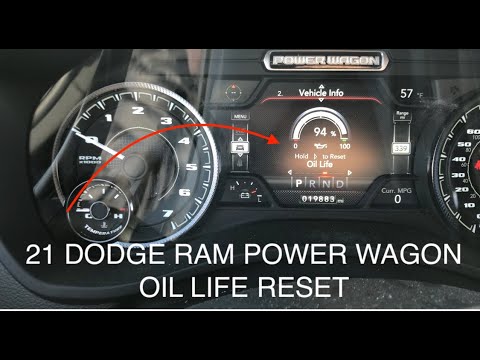
RAM 2500
(2019-2026 /
DT, MK 5)
Manually resetting the Dodge RAM 2500 engine oil change light is really very simple and the whole procedure takes a few seconds to complete even if y…

RAM 2500
(2009-2019 /
D2, MK 4, DS, DJ)
Resetting the oil change light on the 2016 Dodge RAM 2500 is really simple and takes seconds. For this reason it is an operation that can be performe…

RAM 2500
(2009-2019 /
D2, MK 4, DS, DJ)
If you have just changed the oil on your 2015 Dodge RAM and the warning light continues to come on, you must necessarily perform a manual reset to pe…
Other guides you may be interested in
|
How to Remove the Right Front Door Panel on an Opel Mokka
To remove the right front door panel on an Opel Mokka, follow these steps: disconnect the battery terminals located in the engine bay, then use a screwdriver to remove the screws from the upper door opening lever and the screws in the handle. Next, remove the covering plastic near the lever. Unscrew the remaining screws on the door panel and detach the retaining clips. Finally, pull the panel away with your hands and unclip it from the door (disconnect the power wiring and the release cable). Reassemble everything in reverse order. by ScegliAuto More videos
|
|
For advertising on this site Write to info@scegliauto.com
ScegliAuto is not responsible for any inaccuracy of the data in the lists. To report any inaccuracy or your business (if you own the business in question), please write to info@scegliauto.com
Number of seconds to generate the page: 0.174
(c) ScegliAuto 2026 - info@scegliauto.com - Privacy policy VAT number: IT01247470535 |
