
|
Do it yourself
| |||
| ||||


How to enable Cruise control on the Renault Trafic III
Model: Renault Trafic
MK 3
- Years:
2014, 2015, 2016, 2017, 2018, 2019, 2020, 2021, 2022, 2023, 2024, 2025
Video tutorial
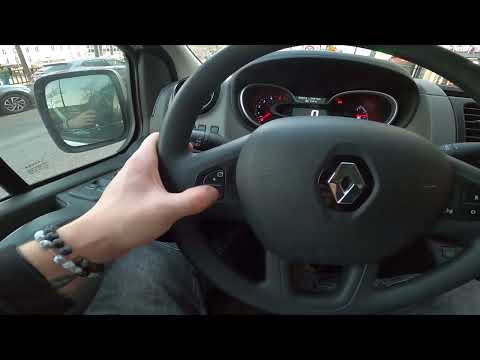
In this video, we will see how to enable Cruise Control on the Renault Trafic III: a particularly useful function on a commercial vehicle, because by setting a fixed speed - which is lower than the maximum speed of the road we are traveling on - we will avoid fines and penalties. On the central dashboard, on the right side of the steering wheel, we will find a button to enable the function. Now we accelerate until we reach the desired speed and then press the button located on the right side of the steering wheel. We can now remove our foot from the accelerator. If we want to increase or decrease the speed, we can do so using the buttons on the left side of the steering wheel, and to deactivate it, we will press the button on the central console again.
Posted on 11 May 2025 by ScegliAuto
Related tutorials
Renault Trafic
(2014-2026 /
MK 3)
Let's see how to enable and disable the driving style indicator on the Renault Trafic III: this is a system designed to analyze and evaluate how a dr…
Renault Trafic
(2014-2026 /
MK 3)
In this video, you will see how to enable and disable the speed limiter on the Renault Trafic III. This is a very important function, especially usef…

Renault Trafic
(2014-2026 /
MK 3)
In this video, we see how to change the cabin air filter of a Renault Trafic III: we need to remove the lower panel of the dashboard under the glove …
Other guides you may be interested in
|
How to Reset the AdBlue Warning Light on a Peugeot Boxer
To reset the AdBlue system on a 2018 Peugeot Boxer, follow these steps: Start the engine and ensure the vehicle is parked in a well-ventilated area. Locate the "MENU" button on the dashboard or steering wheel controls. Press and hold the "MENU" button until the menu options appear on the display. Use the arrow buttons or scroll wheel to access the "Vehicle Settings" or "Settings" menu. Select the "AdBlue" or "AdBlue System" option. Look for the "Recharge" or "Reset" option in the AdBlue menu. Once you find the reset option, select it and confirm your choice when prompted. The system will be reset, and a confirmation message may appear on the display. Turn off the engine and wait a few seconds. Restart the engine and check that the AdBlue system has been reset. by ScegliAuto More videos
|
|
For advertising on this site Write to info@scegliauto.com
ScegliAuto is not responsible for any inaccuracy of the data in the lists. To report any inaccuracy or your business (if you own the business in question), please write to info@scegliauto.com
Number of seconds to generate the page: 0.047
(c) ScegliAuto 2026 - info@scegliauto.com - Privacy policy VAT number: IT01247470535 |
