
|
Do it yourself
| |||
| ||||


How to Replace the Air Filter on a Renault Laguna
Model: Renault Laguna
MK 2, X74, Laguna 2
- Years:
2001, 2002, 2003, 2004, 2005, 2006, 2007
Video tutorial
Let's see how to replace the air filter on a Renault Laguna: open the car door, pull up the engine compartment release lever located at the bottom left of the dashboard, and lift the front bonnet, securing it with the prop rod. Open the air box (unscrew the screws or plastic clips), remove the cover of the filter box, and take out the worn air filter. Insert a new filter into the designated housing (ensuring it fits snugly around the edges). Finally, reattach the cover of the air box and secure it with the clips or screws. Close the front bonnet after maintenance.
Updated on 6 March 2026 by ScegliAuto
Related tutorials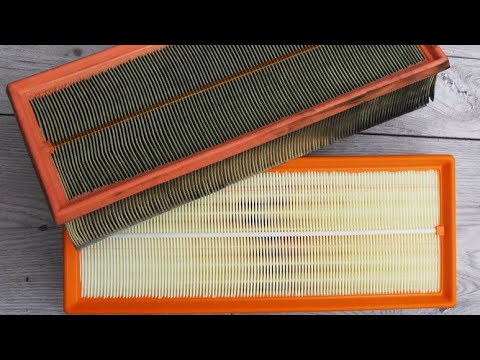
Renault Laguna
(2001-2007 /
MK 2, X74, Laguna 2)
Before you can start, open the bonnet of your Renault Laguna. Begin by unscrewing and removing the screws that secure the upper cover of the air filt…

Renault Laguna
(2007-2015 /
MK III, X91, Laguna III, MK 3, Laguna 3)
Today, replace the cabin air filter on your Renault Laguna 3. Start by removing the side panel of the passenger dashboard and disconnect the airbag c…

Renault Laguna
(2007-2015 /
MK III, X91, Laguna III, MK 3, Laguna 3)
If you want to replace the engine air filter of your Renault Laguna Mk3 correctly and safely, all you have to do is carefully read the steps describe…
Other guides you may be interested in
|
How to Reset the Tyre Pressure Warning Light on the Jeep Renegade?
To reset the tyre pressure warning light on the Jeep Renegade, inflate the tyres until they reach the recommended pressure: this value is indicated on the sticker attached to the driver’s door pillar. Once the tyres are properly inflated, navigate through the menu that appears on the instrument cluster until you find the tyre pressure option. At this point, press and hold the OK button on the right side of the steering wheel to make the warning light disappear. by ScegliAuto More videos
|
|
For advertising on this site Write to info@scegliauto.com
ScegliAuto is not responsible for any inaccuracy of the data in the lists. To report any inaccuracy or your business (if you own the business in question), please write to info@scegliauto.com
Number of seconds to generate the page: 0.046
(c) ScegliAuto 2026 - info@scegliauto.com - Privacy policy VAT number: IT01247470535 |
