
|
Do it yourself
| |||
| ||||


How do I adjust the belt tension of the Smart 450?
Model: Smart Smart
450
- Years 1998-2007
To be able to adjust the belt tension of the Smart 450, you must first access its belt tensioner. In order to access this part, the front bumper of the car and also the left front wheel must be removed beforehand. In this way, the belt tensioner can be removed from its housing and possibly also replaced with a new spare part. When the belt tensioner is installed, it will be possible to adjust it by screwing and unscrewing the nut that fixes its pin. In this way it will be possible to increase or decrease the tension of the timing belt.
Posted on 7 January 2022 by ScegliAuto
Video tutorial
Related tutorials
Smart
(1998-2007 /
450)
To replace the timing belt of the Smart Fortwo model 450, we need to access the bottom part of the engine hood, located at the back of the vehicle. O…

Smart
(1998-2007 /
450)
To get to the alternator on Smart 450 you have to remove the right rear wheel. So loosen the bolts, lift the vehicle and remove the bolts first and t…

Smart
(1998-2007 /
450)
Let's find out the procedure needed to disassemble and replace the starter motor on the Smart Fortwo 450, first series, by following the instructions…
Other guides you may be interested in
|
Frequently Asked QuestionsHow to Remove the Mirror Cap on a Toyota Auris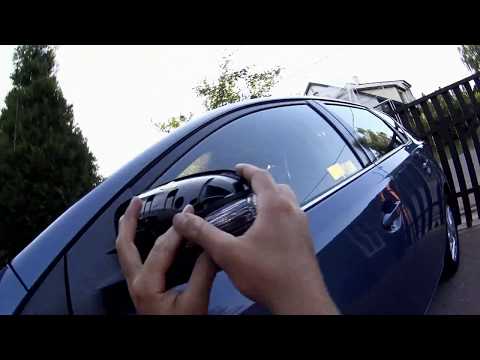
How to proceed with the removal of the mirror cap on a Toyota Auris? Use a plastic lever to detach the mirror cap and the mirror itself. Pry until the cover comes off the mirror (this operation is very delicate as it may break). Once the piece is removed, take out the side indicator (for replacement), and you can replace it with the new one. Refit the new mirror cover by inserting it into the mirror and securing the plastic with the appropriate clips. Check the correct functioning of the part. by ScegliAuto More videos
|
|
For advertising on this site Write to info@scegliauto.com
ScegliAuto is not responsible for any inaccuracy of the data in the lists. To report any inaccuracy or your business (if you own the business in question), please write to info@scegliauto.com
Number of seconds to generate the page: 0.072
(c) ScegliAuto 2026 - info@scegliauto.com - Privacy policy VAT number: IT01247470535 |
