
|
Do it yourself
| |||
| ||||


How to change the key battery of a Toyota Rav4?
Model: Toyota Rav 4
Xa50, MK 5
- Years 2019-2026
The remote battery for the Toyota Rav4 is a 3-volt button cell type CR2032. Depending on the brand, the price can range from 25 pence to a maximum of £1. Replacing it is straightforward and can be done even by those with little experience. First, pull out the key blade by pulling it outward while pressing the release lever. Then use the same blade as a lever, inserting it into the slot shown in the video, to separate the two halves of the remote casing. Now, simply replace the old battery with the new one and close the remote.
Updated on 16 July 2026 by ScegliAuto
Video tutorial
Related tutorials
Toyota Rav 4
(2000-2006 /
Xa20, MK 2)
In this guide aimed at all of you who own a Toyota RAV4, we will help you complete the procedure to replace the battery inside the key. First of all,…

Toyota Rav 4
(2013-2018 /
MK 4, Xa40)
Today we will see how to change the battery of a Toyota RAV4 produced from the year 2013 to the year 2018. So let's start the procedure by extracting…

Toyota Rav 4
(2019-2026 /
Xa50, MK 5)
In this new guide aimed at all of you who own a Toyota RAV4 latest model, we will explain to you all the various steps you need to take to successful…
Other guides you may be interested in
|
How to change the time on a Toyota Yaris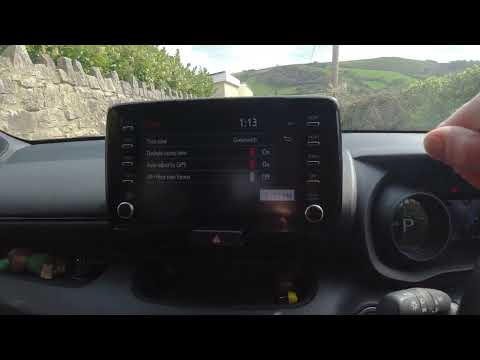
In this video we see how to change the time on a Toyota Yaris, specifically when it comes to switching from daylight saving time to standard time and vice versa. We go to the multifunction screen and press "settings": from there we go to press the clock, simply click on daylight saving time, and the clock will change the time for us, without doing anything else. All we want to do is just adjust the time format to 12 or 24 hours, as is customary in the area where we live: for example in Anglo-Saxon countries it is common to set the time to 12 hours, while in the European Union it is normally set to 24 hours. by ScegliAuto More videos
|
|
For advertising on this site Write to info@scegliauto.com
ScegliAuto is not responsible for any inaccuracy of the data in the lists. To report any inaccuracy or your business (if you own the business in question), please write to info@scegliauto.com
Number of seconds to generate the page: 0.280
(c) ScegliAuto 2026 - info@scegliauto.com - Privacy policy VAT number: IT01247470535 |
