
|
Do it yourself
| |||
| ||||


How to Set the Digital Speedometer on a Volkswagen Touareg
Model: Volkswagen Touareg
MK 3, CR
- Years 2018-2026
Let’s see how to set the digital speedometer on a Volkswagen Touareg (and other similar models from the Volkswagen group with a digital instrument cluster) using the buttons on the right side of the steering wheel. Turn on the ignition and press the 'view' button, represented by an icon with two overlapping rectangles. Use the arrow buttons to scroll through the different display modes, looking for a layout that includes the digital speedometer (usually a large number in the centre). Press 'ok' (using the central button on the pad to the right of the steering wheel) to select the desired display.
Posted on 2 May 2026 by ScegliAuto
Video tutorial
Related tutorials
Volkswagen Touareg
(2010-2018 /
MK 2, 7P)
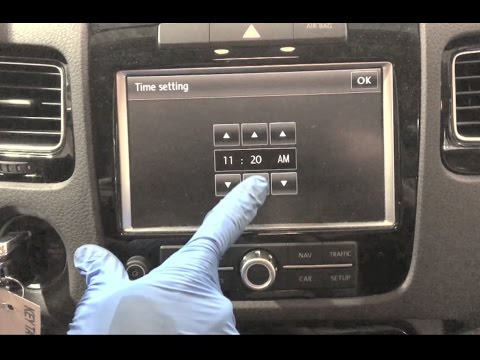
Follow these instructions to set the time on your Volkswagen Touareg in simple and quick steps. First, get in the vehicle and insert the key, turning…
Volkswagen Touareg
(2010-2018 /
MK 2, 7P)
To set the clock on the Volkswagen Touareg, first turn on the instrument cluster and then press the SETUP button located below the central display on…

Volkswagen Touareg
(2010-2018 /
MK 2, 7P)
In this tutorial we can see how to adjust the time in the Volkswagen Touareg, an extremely simple and quick operation, to be carried out for example …
Other guides you may be interested in
|
How to reset the tyre pressure warning light on the Dacia Sandero?
To reset the tyre pressure warning light on the Dacia Sandero, inflate all the tyres to the pressure indicated on the label on the driver's door. Once the tyres are inflated, turn on the ignition and navigate through the menu using the controls on the right side of the steering wheel. Scroll with the arrows to find the tyre pressure option: by holding down the OK button located on the right side of the steering wheel, you can reset the warning light. by ScegliAuto More videos
|
|
For advertising on this site Write to info@scegliauto.com
ScegliAuto is not responsible for any inaccuracy of the data in the lists. To report any inaccuracy or your business (if you own the business in question), please write to info@scegliauto.com
Number of seconds to generate the page: 0.077
(c) ScegliAuto 2026 - info@scegliauto.com - Privacy policy VAT number: IT01247470535 |
