
|
Do it yourself
| |||
| ||||


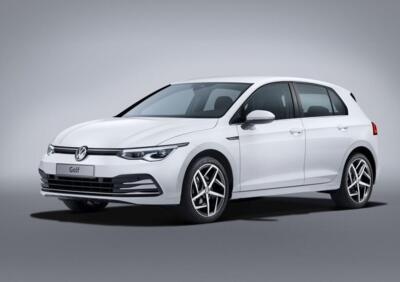
Where are the Fuses on the Volkswagen Golf 8?
Model: Volkswagen Golf
Golf 8, MK 8, Golf Viii
- Years 2019-2026
Video tutorial
Detailed instructions - On the Volkswagen Golf 8, the fuse boxes contain all the fuses that manage the operation of the devices installed in the vehicle: in this type of vehicle, you will find two boxes that serve to contain the fuses. The first will be located in the dashboard behind the glove compartment: this contains the fuses that regulate the operation of the airbags, courtesy lights, cabin fan, etc. The second box will be located on the right side of the engine compartment: this will contain the fuses for the windscreen wipers, dipped headlights, etc.
Posted on 8 October 2026 by ScegliAuto
Related tutorials
Volkswagen Golf
(2003-2008 /
MK 5, Golf 5, Golf V)
The fuses in the Volkswagen Golf Plus are located in the glove compartment on the driver's side, under the front dashboard. You can access the fuse b…
Volkswagen Golf
(2003-2008 /
MK 5, Golf 5, Golf V)
All the fuses in the Volkswagen Golf 5 are located within the designated fuse boxes installed in the vehicle. The first box is situated inside the en…
Volkswagen Golf
(2003-2008 /
MK 5, Golf 5, Golf V)
The fuses for the Volkswagen Golf 5 1.9 TDI are located within the designated boxes inside the car. The first box is located in the engine compartmen…
Other guides you may be interested in
|
Frequently Asked QuestionsHow to Set the Clock on a Toyota Yaris Cross
To adjust the clock on the Toyota Yaris Cross, start the car, press the button with the right arrow to navigate through the different screens; keep pressing until you reach a list, then press the "OK" button on the "clock" option; use the up or down arrow to set the desired hour, then scroll right to set the minutes and use the up or down arrow to select the desired minutes. Once the correct time is set, press the "OK" button, go back, and return to the main screen. Finally, turn off the car. by ScegliAuto More videos
|
|
For advertising on this site Write to info@scegliauto.com
ScegliAuto is not responsible for any inaccuracy of the data in the lists. To report any inaccuracy or your business (if you own the business in question), please write to info@scegliauto.com
Number of seconds to generate the page: 0.174
(c) ScegliAuto 2026 - info@scegliauto.com - Privacy policy VAT number: IT01247470535 |
