
|
Do it yourself
| |||
| ||||


How to Reset the Service Light on a Volkswagen Polo
Model: Volkswagen Polo
Polo 5, Polo V, MK 5, MK V, 6R
- Years 2009-2017
In this video tutorial, you can see how to reset the maintenance light on a Volkswagen Polo. When the service light with the spanner icon illuminates, the first step is to perform maintenance on the vehicle, such as changing the oil and filters. Next, enter the vehicle and engage the handbrake; there are buttons located below the speedometer that will be used. Remove the key and press the button located below the speedometer on the left; when the display lights up, release the button. When the time appears on the display, press and hold the button below the speedometer on the left again and turn on the ignition. Turn off the vehicle and then restart it to check that the Service light has turned off. Reset completed.
Updated on 7 July 2026 by ScegliAuto
Video tutorial
Related tutorials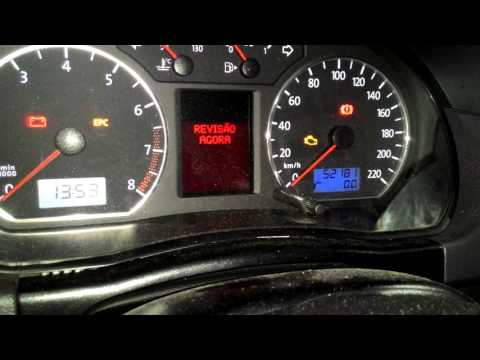
Volkswagen Polo
(2001-2009 /
MK IV, Polo IV, Polo 4, MK 4, 9N)
Resetting the service light on the Volkswagen Polo is a straightforward procedure that you can carry out independently, thanks to our short video tut…

Volkswagen Polo
(2017-2025 /
Polo VI, Polo 6, MK 6, AW1, MK VI)
In this guide, we will discover the steps that will allow us to reset the service light for the regular maintenance oil change of the Volkswagen Polo…

Volkswagen Polo
(2009-2017 /
Polo 5, Polo V, MK 5, MK V, 6R)
In this guide, we will see the steps to reset the service interval on a Volkswagen Polo. First, get into the vehicle and start pressing and holding t…
Other guides you may be interested in
|
Frequently Asked QuestionsHow to Replace the Remote Battery for the Volvo XC40?
In this tutorial, you will see how to replace the battery in the remote for the Volvo XC40, a very simple and quick operation. For this, you will need a replacement battery of type CR2032 and possibly a small flathead screwdriver. First, remove the front cover by pressing the button on the metal ring, then locate the second button, press it as well, and remove the opposite cover. Next, open the circular cap, take out the old battery, and insert the new one in the opposite direction. Finally, reassemble everything. by ScegliAuto More videos
|

|
For advertising on this site Write to info@scegliauto.com
ScegliAuto is not responsible for any inaccuracy of the data in the lists. To report any inaccuracy or your business (if you own the business in question), please write to info@scegliauto.com
Number of seconds to generate the page: 0.115
(c) ScegliAuto 2026 - info@scegliauto.com - Privacy policy VAT number: IT01247470535 |
