
|
Do it yourself
| |||
| ||||


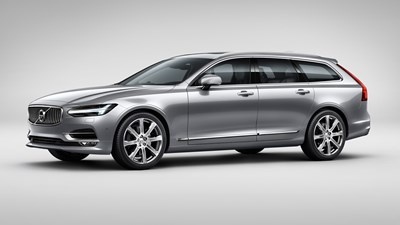
How to deactivate and activate the passenger airbag of the Volvo V90.
Today we will see how to deactivate and activate the rear passenger airbag of the Volvo V90. Open the front passenger door and turn the switch located at the end of the passenger dashboard to the "off" position to deactivate the airbag; this operation will be indicated on the instrument panel. Next, to activate the airbag, we need to turn the switch to "on"; in this case as well, the operation will be indicated on the instrument panel. If the warning light comes on, it is necessary to check the proper functioning of the airbag, as any malfunction can be critical during a car accident.
Posted on 10 January 2026 by ScegliAuto
Video tutorial
Related tutorials
Volvo V90
(2016-2024 /
MK 1)
You can disable the passenger airbag in the Volvo V90 by opening the front passenger door to access the side of the dashboard: in this area, you will…

Volvo V90
(2016-2024 /
MK 1)
If the devices in our Volvo V90 have suddenly stopped working, we can first check the status of the corresponding fuses, whose diagrams are indicated…

Volvo V90
(2016-2024 /
MK 1)
We will briefly see the instructions that will allow us to disassemble and replace the cabin air filter of the Volvo V90. First, let's get into the c…
Other guides you may be interested in
|
How to reset the tyre pressure warning light on a Hyundai Tucson
Below are the instructions to reset the tyre pressure warning light (TPMS) on a Hyundai Tucson. First, get into the vehicle and turn on the instrument cluster; then navigate to the vehicle settings until you reach the tyre pressure monitor, identifying the tyre with incorrect pressure. At this point, restore all tyre pressures according to the specifications indicated on the label; this will reset the TPMS and the warning light will be cleared from the instrument cluster! by ScegliAuto More videos
|
|
For advertising on this site Write to info@scegliauto.com
ScegliAuto is not responsible for any inaccuracy of the data in the lists. To report any inaccuracy or your business (if you own the business in question), please write to info@scegliauto.com
Number of seconds to generate the page: 0.809
(c) ScegliAuto 2026 - info@scegliauto.com - Privacy policy VAT number: IT01247470535 |
