
|
Do it yourself
| |||
| ||||


Audi A5 - Onboard computerOnboard Computer Audi A5 (2018-2025 / 8 w 6) Audi A5 (2007-2016 / 8T8, 8T, 8T3, 8F) How to Deactivate the Component Protection on the 2014 Audi A5 Component Protection activates on 2014 Audi A5 vehicles and others when the control unit, radio, or instrument cluster is replaced with parts from another …Read all… Posted on 22 June 2026 by ScegliAuto  Audi A5 (2018-2025 / 8W6) How to activate Launch Control on an Audi vehicle In this video we see how to activate Launch Control in an Audi car equipped with this option: it is an electronic starting system that allows for …Read all… Posted on 5 July 2025 by ScegliAuto 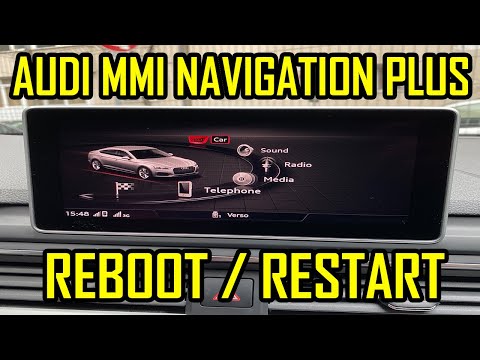 Audi A5 (2018-2025 / 8W6) How to Restart the MMI System on Audi A5 B9 If the MMI infotainment system in your latest generation Audi A5, model produced from 2018 onwards, experiences one or more malfunctions, you can try to …Read all… Posted on 21 August 2026 by ScegliAuto Onboard Computer Audi A5 (2007-2016 / 8t8, 8t, 8t3, 8 f)
Audi A5 (2007-2016 / 8T8, 8T, 8T3, 8F)How to Deactivate the Component Protection on the 2014 Audi A5 Component Protection activates on 2014 Audi A5 vehicles and others when the control unit, radio, or instrument cluster is replaced with parts from another …Read all… Posted on 22 June 2026 by ScegliAuto
Audi A5 (2018-2025 / 8W6)How to activate Launch Control on an Audi vehicle In this video we see how to activate Launch Control in an Audi car equipped with this option: it is an electronic starting system that allows for …Read all… Posted on 5 July 2025 by ScegliAuto
Audi A5 (2018-2025 / 8W6)How to Restart the MMI System on Audi A5 B9 If the MMI infotainment system in your latest generation Audi A5, model produced from 2018 onwards, experiences one or more malfunctions, you can try to …Read all… Posted on 21 August 2026 by ScegliAuto Airbag (1) Car stereo (3) Battery (5) Transmission (2) Convertible top (1) Body (3) Wheel rim (1) Key (15) Timing belt (3) Onboard computer (3) Checks and maintenance (8) Headlight (3) Tail light (4) Fog lights (1) Cabin air filter (4) Light bulb (1) Headlight bulb (6) Handle (5) Starter motor (1) Transmission fluid (1) Engine oil (3) Clock (3) Door trim panel (5) Front bumper (4) Pump (1) Fuel pump (1) Push button (1) Fuse box (22) Seat (3) Door lock (1) Side mirror (5) AdBlue warning light (3) Warning light – error code (6) Tire pressure warning light (16) Service warning light (23) Fuel cap (6) Center console tunnel (1) Blower motor (1) Side window (1) |
How to open the bonnet on a Volkswagen Golf?
In this tutorial, you will see how to open the bonnet on a Volkswagen Golf MK4. This is a very simple operation that follows the standard procedure. First, open the driver's door, then locate the lever in the lower left area and pull it. Next, move to the front of the vehicle, lift the bonnet slightly, and find the second lever located just above the Volkswagen logo. At this point, simply pull it towards you, fully open the bonnet, and secure it with the prop rod. To close it, gently push it down. by ScegliAuto More videos
|
|
For advertising on this site Write to info@scegliauto.com
ScegliAuto is not responsible for any inaccuracy of the data in the lists. To report any inaccuracy or your business (if you own the business in question), please write to info@scegliauto.com
Number of seconds to generate the page: 0.007
(c) ScegliAuto 2026 - info@scegliauto.com - Privacy policy VAT number: IT01247470535 |
