
|
Do it yourself
| |||
| ||||


BMW key battery replacement
Model: BMW BMW Various
Changing the battery of the remote control inherent in BMW cars is very simple, and now we show it to you. First, remove the manual key from the casing by pressing the button. Once this is done, "exploit" the space left by the aforementioned key to pry into the casing and thus divide it into two parts. For this operation, if you do not want to use the key for fear that it will be damaged, use a small flat screwdriver. With the same screwdriver, remove the small battery from its seat and replace it with the new one (which can be found in any hardware store for a few euros), then reassemble everything.
Posted on 11 February 2021 by ScegliAuto
This video is currently unavailable
Related tutorials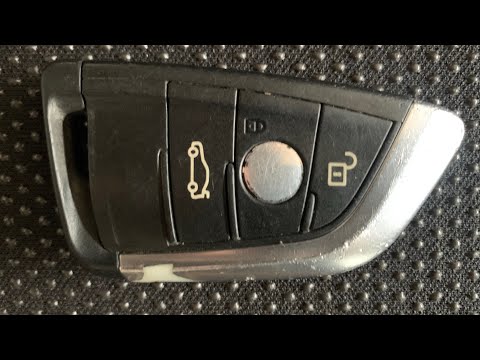
BMW BMW Various
To replace the battery of a BMW remote control key, it is necessary to proceed as follows: take the key and extract the emergency key by pressing the…

BMW BMW Various
Replacing the battery in the remote control requires no special technical skills and can be done by anyone with a flat screwdriver. First, we extract…

BMW BMW Various
If we want to replace the key battery on BMW models of the 1,3, 5 series, and also of the X series, in the description below we will find the informa…
Other guides you may be interested in
|
How to Change the Cabin Filter on an Opel Mokka
Learn how to change the cabin filter fitted in the Opel Mokka. Open the glove compartment and disconnect the plastic guides (located on the sides of the drawer if present), unscrew the pins around the perimeter of the drawer; rotate the glove compartment forward, pull off the cover cap, and remove the air filter from its housing as shown in the video. Once this is done, insert the new ventilation filter into the filter holder (ensure the filter is inserted correctly without bending it). Finally, refit the cover of the box along with all the components of the glove compartment as they were removed earlier. by ScegliAuto More videos
|
|
For advertising on this site Write to info@scegliauto.com
ScegliAuto is not responsible for any inaccuracy of the data in the lists. To report any inaccuracy or your business (if you own the business in question), please write to info@scegliauto.com
Number of seconds to generate the page: 0.135
(c) ScegliAuto 2026 - info@scegliauto.com - Privacy policy VAT number: IT01247470535 |
