
|
Do it yourself
| |||
| ||||


Transforming the BMW Key into a Smart Key with Display
Model: BMW BMW Various
Video tutorial
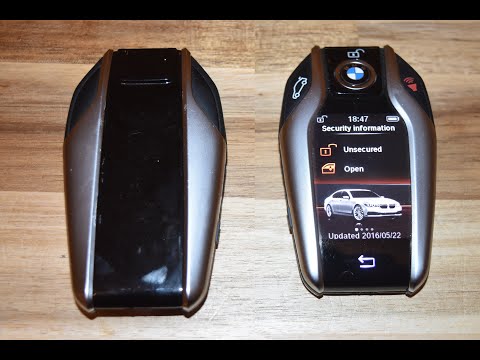
In this video, see how you can transform your key into a smart key with a display, given some time, a bit of money (not too much), and some electronic knowledge. You can find this key on AliExpress with the code 1005004370028182 for £11.30, with free delivery. One warning: order it with the buttons in English. Besides the display, it has functions like comfort assist, but you lose the emergency key functionality (which you can still keep on your keyring). Now, you need to transfer the electronic board from your key into the new shell, adapting it with some soldering for the power and boot, then refit everything inside the new shell and check that it works.
Updated on 26 September 2026 by ScegliAuto
Related tutorials
BMW BMW Various
To reset the infotainment system of a BMW, you will need to turn on the instrument panel by inserting the ignition key into the corresponding slot: o…
BMW BMW Various
New BMW models feature a smart key with a mini touchscreen display that allows car owners to perform various operations with a touch. After many hour…

BMW BMW Various
It will be possible to adjust the iDrive system of BMW by first inserting the ignition key and turning on the instrument panel by pressing the approp…
Other guides you may be interested in
|
How to Remove the Toll Tag Holder from the Car Windscreen
The toll tag holder is usually attached to the car windscreen to ensure that the toll tag functions immediately when passing through barriers. However, if you decide to remove the holder, you should follow this procedure: - Insert the toll tag into the holder; - Pull the holder inwards to detach it from the windscreen; you can use a glass scraper or a stiff plastic card to assist you; After removing the holder, it is essential to remove the adhesive from the windscreen. To remove the adhesive, we recommend using a solvent-based spray that will remove the glue without clouding the area. by ScegliAuto More videos
|
|
For advertising on this site Write to info@scegliauto.com
ScegliAuto is not responsible for any inaccuracy of the data in the lists. To report any inaccuracy or your business (if you own the business in question), please write to info@scegliauto.com
Number of seconds to generate the page: 0.067
(c) ScegliAuto 2026 - info@scegliauto.com - Privacy policy VAT number: IT01247470535 |
