
|
Do it yourself
| |||
| ||||


How to Replace the Key Battery for the Cadillac ATS
Model: Cadillac ATS
MK 1
- Years 2013-2019
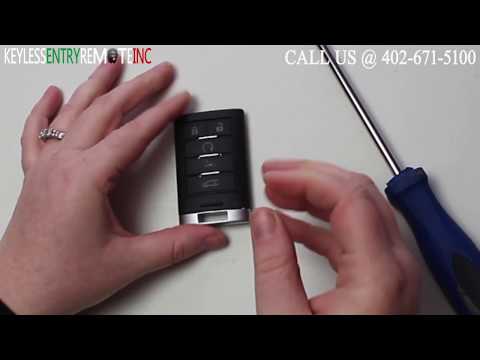
If the smart key for your Cadillac ATS is no longer working and you want to replace the battery inside, simply follow the steps outlined in this mini guide. First, pull out the physical emergency key to completely remove it. Then, use the same key to remove the back cover and gain access to the dead battery. Finally, remove the old battery and replace it with a new CR2032 button battery. Reattach the back cover you removed earlier and insert the physical key back in.
Updated on 4 June 2026 by ScegliAuto
Video tutorial
Related tutorials
Cadillac ATS
(2013-2019 /
MK 1)
If you own a Cadillac ATS and want to find out the steps to replace the exhausted battery located inside the key, all you have to do is read the foll…

Cadillac ATS
(2013-2019 /
MK 1)
To replace the button battery inside your Cadillac ATS key (2013-2019), it only takes a few seconds. Here's how to do it. First, pull up the top part…
Cadillac ATS
(2013-2019 /
MK 1)
To replace the remote battery on Cadillac ATS, first prepare the necessary materials: a remote battery, model: "CR 2032 3V", and a small flathead scr…
Other guides you may be interested in
|
How to Open the Bonnet on the Lancia Y
To open the bonnet on this vehicle, follow these simple instructions: first, open the driver's door and locate the lever positioned just below the dashboard, marked with an image of the vehicle with the bonnet open. Pull this lever towards you until you hear a "click" indicating the bonnet is released. Next, exit the cabin and stand in front of the bonnet to disengage the safety catch and complete the opening. To do this, slightly lift the bonnet, locate the yellow lever underneath, and pull it to the left to fully release and open the bonnet. by ScegliAuto More videos
|
|
For advertising on this site Write to info@scegliauto.com
ScegliAuto is not responsible for any inaccuracy of the data in the lists. To report any inaccuracy or your business (if you own the business in question), please write to info@scegliauto.com
Number of seconds to generate the page: 0.198
(c) ScegliAuto 2026 - info@scegliauto.com - Privacy policy VAT number: IT01247470535 |
