
|
Do it yourself
| |||
| ||||


How to reset the AdBlue warning light in the Chevrolet Cruze?
Model: Chevrolet Cruze
MK 1, J300
- Years 2009-2015
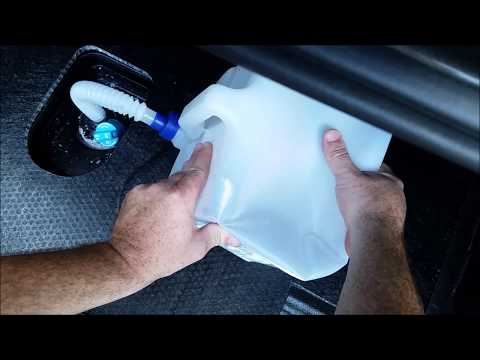
If the AdBlue warning light has illuminated on the dashboard of your Chevrolet Cruze, it means that the fluid in the emission control system has reached the minimum level and therefore needs to be topped up. This is a very simple and quick operation; let's see how to proceed in this tutorial. First, purchase a canister of urea from any car parts store, then ensure the engine is off and open the rear hatch. Next, lift the floor panel, unscrew the indicated blue cap, and pour the necessary amount of fluid into the hole to reach the maximum level.
Updated on 29 August 2026 by ScegliAuto
Video tutorial
Related tutorials
Chevrolet Cruze
(2009-2015 /
MK 1, J300)
In this short guide, we will see the instructions that will allow us to top up the AdBlue liquid of the Chevrolet Cruze. First, we open the rear hatc…
Chevrolet Cruze
(2009-2015 /
MK 1, J300)
If the AdBlue warning light on your Chevrolet Cruze has illuminated, it means the fluid in the emissions system has reached the minimum level and nee…

Chevrolet Cruze
(2009-2015 /
MK 1, J300)
In order to reset the tire pressure warning light that appears on the instrument panel of the Chevrolet Cruze, you must inflate the tires to the reco…
Other guides you may be interested in
|
How to Open the Bonnet on the Lancia Y
To open the bonnet on this vehicle, follow these simple instructions: first, open the driver's door and locate the lever positioned just below the dashboard, marked with an image of the vehicle with the bonnet open. Pull this lever towards you until you hear a "click" indicating the bonnet is released. Next, exit the cabin and stand in front of the bonnet to disengage the safety catch and complete the opening. To do this, slightly lift the bonnet, locate the yellow lever underneath, and pull it to the left to fully release and open the bonnet. by ScegliAuto More videos
|
|
For advertising on this site Write to info@scegliauto.com
ScegliAuto is not responsible for any inaccuracy of the data in the lists. To report any inaccuracy or your business (if you own the business in question), please write to info@scegliauto.com
Number of seconds to generate the page: 0.111
(c) ScegliAuto 2026 - info@scegliauto.com - Privacy policy VAT number: IT01247470535 |
