
|
Do it yourself
| |||
| ||||


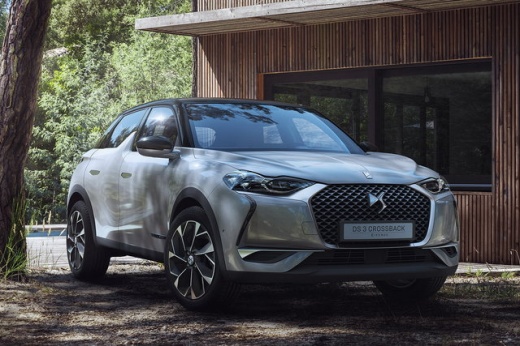
Accessories to Personalise the DS3
Model: DS DS 3
MK 2
- Years:
2018, 2019, 2020, 2021, 2022, 2023, 2024, 2025, 2026
Video tutorial
This video showcases various accessories available for personalising the DS3: carbon fibre details for the console, with the entire dashboard also available in carbon fibre; the chrome headlights at the front of the vehicle are very elegant, and the decals that can be applied to the body of the car add great personality. The centre bolts of the alloy wheels featuring the DS logo are very distinctive, and the wheels come in multiple designs to suit personal preferences. The rear lights are designed with a 3D LED pattern. There is also a choice of various gear knobs and covers for the external mirrors: the rear spoiler contains the third brake light. In the boot, a practical rubber tray prevents items like umbrellas from making a mess. Additionally, there is the option to install a practical roof box for transporting extra materials, along with a bike rack that perfectly fits the vehicle's body. Don't forget the car cover, velvet floor mats, parking sensors, the alarm system, and locking bolts for the wheels: all original Citroen accessories.
Updated on 21 September 2026 by ScegliAuto
Related tutorials
DS DS 3
(2015-2018 /
MK 1)
In this guide we will see the instructions on how to reset the service light for the regular maintenance of the engine oil change of the Citroen DS3.…

DS DS 3
(2015-2018 /
MK 1)
The car reviewed in this video is the one we are talking about in this section, namely the DS3. It offers us the possibility to consult various infor…

DS DS 3
(2018-2026 /
MK 2)
In this tutorial, you will see how to reset the service light in the Citroen DS3, a very simple and quick operation, to be performed only after compl…
Other guides you may be interested in
|
How to Reset the AdBlue Warning Light on a Peugeot Boxer
To reset the AdBlue system on a 2018 Peugeot Boxer, follow these steps: Start the engine and ensure the vehicle is parked in a well-ventilated area. Locate the "MENU" button on the dashboard or steering wheel controls. Press and hold the "MENU" button until the menu options appear on the display. Use the arrow buttons or scroll wheel to access the "Vehicle Settings" or "Settings" menu. Select the "AdBlue" or "AdBlue System" option. Look for the "Recharge" or "Reset" option in the AdBlue menu. Once you find the reset option, select it and confirm your choice when prompted. The system will be reset, and a confirmation message may appear on the display. Turn off the engine and wait a few seconds. Restart the engine and check that the AdBlue system has been reset. by ScegliAuto More videos
|
|
For advertising on this site Write to info@scegliauto.com
ScegliAuto is not responsible for any inaccuracy of the data in the lists. To report any inaccuracy or your business (if you own the business in question), please write to info@scegliauto.com
Number of seconds to generate the page: 0.047
(c) ScegliAuto 2026 - info@scegliauto.com - Privacy policy VAT number: IT01247470535 |
