
|
Do it yourself
| |||
| ||||



How to Reset the Service Light on a Ford Galaxy?
Model: Ford Galaxy
MK 2
- Years:
2006, 2007, 2008, 2009, 2010, 2011, 2012, 2013, 2014, 2015
Video tutorial
To reset the Service light on a Ford Galaxy, turn on the ignition by inserting the key into the ignition switch. Once the dashboard is lit, press and hold the button located in the centre of the dashboard, next to the small display. After a few seconds, you will notice the Service light start to flash until it turns off completely. After this operation, you can switch off and then back on the dashboard to verify that the reset has been successful.
Updated on 2 August 2026 by ScegliAuto
Related tutorials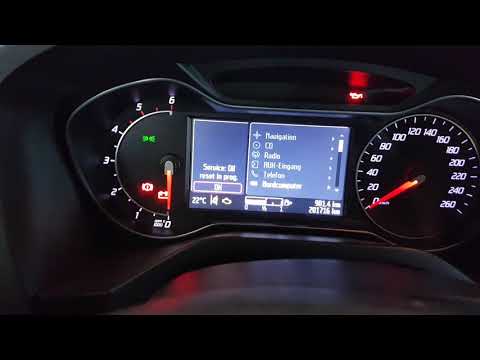
Ford Galaxy
(2006-2015 /
MK 2)
In this short video tutorial, you will learn how to reset the service light on a second-generation Ford Galaxy. To perform the reset, first, turn on …

Ford Galaxy
(2006-2015 /
MK 2)
The Service light that is shown on the instrument panel of the Ford Galaxy can be reset by inserting the ignition key into the corresponding slot, so…

Ford Galaxy
(2015-2023 /
MK 3)
Due to a small electronic error or human forgetfulness, it may happen that the service light remains on the instrument panel of your Ford Galaxy Mk3 …
Other guides you may be interested in
|
How to Remove the Toll Tag Holder from the Car Windscreen
The toll tag holder is usually attached to the car windscreen to ensure that the toll tag functions immediately when passing through barriers. However, if you decide to remove the holder, you should follow this procedure: - Insert the toll tag into the holder; - Pull the holder inwards to detach it from the windscreen; you can use a glass scraper or a stiff plastic card to assist you; After removing the holder, it is essential to remove the adhesive from the windscreen. To remove the adhesive, we recommend using a solvent-based spray that will remove the glue without clouding the area. by ScegliAuto More videos
|
|
For advertising on this site Write to info@scegliauto.com
ScegliAuto is not responsible for any inaccuracy of the data in the lists. To report any inaccuracy or your business (if you own the business in question), please write to info@scegliauto.com
Number of seconds to generate the page: 0.078
(c) ScegliAuto 2026 - info@scegliauto.com - Privacy policy VAT number: IT01247470535 |
