
|
Do it yourself
| |||
| ||||



Resetting the Oil Light on a 2014 Mazda 6
Model: Mazda 6
GJ, MK 3
- Years:
2012, 2013, 2014, 2015, 2016, 2017, 2018, 2019, 2020, 2021, 2022, 2023
Video tutorial
The author of this video wants to show us how simple it is to reset the oil change light on a 2014 Mazda 6. As the YouTuber illustrates, first, we need to turn on the instrument panel while keeping the engine off. Then, use the "info" button (and the corresponding arrows) located on the left side of the steering wheel to navigate through the onboard computer menu. Move to the "settings" option and select it by pressing the "info" button. Do the same with the other indicated options: maintenance, schedule, and finally set distance. From here, press the info button twice, and you have reset the light!
Posted on 12 February 2026 by ScegliAuto
Related tutorials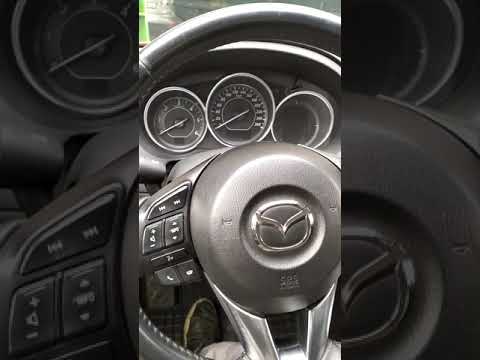
Mazda 6
(2012-2024 /
GJ, MK 3)
Resetting the oil light on the Mazda 6 is a very straightforward operation that can be done independently. Once inside the vehicle, switch on the ins…

Mazda 6
(2012-2024 /
GJ, MK 3)
This guide shows how to reset the service lights on a 2012 Mazda 6 without using any diagnostic device. The procedure is performed directly from the …

Mazda 6
(2012-2024 /
GJ, MK 3)
There are two effective methods to reset the service light on a third-generation Mazda 6. The video provided shows both methods using a 2017 model. T…
Other guides you may be interested in
|
How to Open the Fuel Flap on a Volkswagen Tiguan?
To open the fuel flap on a Volkswagen Tiguan, first unlock the car using the appropriate button on the remote. This will open the car and unlock the mechanism that controls the fuel flap. At this point, apply light pressure to the left side of the flap to open it and access the cap underneath. Once this is unscrewed, you can refuel and then close everything. by ScegliAuto More videos
|
|
For advertising on this site Write to info@scegliauto.com
ScegliAuto is not responsible for any inaccuracy of the data in the lists. To report any inaccuracy or your business (if you own the business in question), please write to info@scegliauto.com
Number of seconds to generate the page: 0.049
(c) ScegliAuto 2026 - info@scegliauto.com - Privacy policy VAT number: IT01247470535 |
