
|
Do it yourself
| |||
| ||||



How to access the workshop menu of the Mercedes C-Class W205
Model: Mercedes Classe C
W205
- Years:
2014, 2015, 2016, 2017, 2018, 2019, 2020, 2021
Video tutorial
In this video, we see how to access the workshop menu of the Mercedes C-Class W205: we insert the key into the ignition and turn on the instrumentation (or press the start button once). We simultaneously press three buttons on the steering wheel: the "ok" button (in the center of the touchpad); the phone call button, located on the left; the "S" button to call up the voice command, which is located on the right (unlike what is seen in the video where only two buttons are pressed; the combination depends on the version). We hold them down for 10 seconds. After a moment, the workshop menu will appear, which can be called "ESD" or "engineering service menu". In the video, the YouTuber uses it to access the function of positioning the brake calipers in maintenance mode, but it is also used for maintenance resets, error code reading, actuator testing (lights, climate, etc.) and system information (software versions, technical data, etc.).
Posted on 9 September 2025 by ScegliAuto
Related tutorials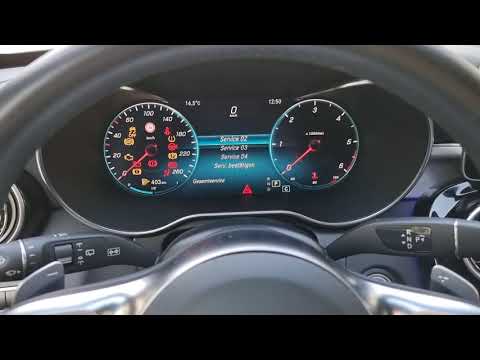
Mercedes Classe C
(2014-2021 /
W205)
.. the maintenance light on the Mercedes-Benz C-Class W205, you need to access the secret menu of the car. Although it may seem complicated and difficult.. …

Mercedes Classe C
(2014-2021 /
W205)
.. test and brake pad service) on the Mercedes C-Class W205. First, turn on the instrument cluster; enter the trip menu. Press the "ok" button and the.. …

Mercedes Classe C
(2014-2021 /
W205)
The service light on the Mercedes-Benz C-Class model W205 is reset after completing the maintenance service. To reset the service light, do the follo…
Other guides you may be interested in
|
How to reset the tyre pressure warning light on the Kia Niro EV?
To reset the tyre pressure warning light on the Kia Niro EV, inflate the tyres until they reach the correct pressure value. This value is indicated on the sticker attached to the driver's door pillar. Once the tyres are inflated, turn on the instrument cluster to check that the warning light has completely disappeared from the display. If it is still present, you may need to drive for a few miles to ensure it disappears completely from the screen. by ScegliAuto More videos
|
For advertising on this site Write to info@scegliauto.com
ScegliAuto is not responsible for any inaccuracy of the data in the lists. To report any inaccuracy or your business (if you own the business in question), please write to info@scegliauto.com
Number of seconds to generate the page: 0.118
(c) ScegliAuto 2026 - info@scegliauto.com - Privacy policy VAT number: IT01247470535 |
