
|
Do it yourself
| |||
| ||||


How do you reset the tire pressure warning light of the MG Astor?
Model: MG MG Various
In order to reset the tire pressure warning light on the MG Astor, you need to inflate the tires until they reach the recommended pressure value: this value is indicated on the sticker attached to the driver's side door frame. Once the inflation is complete, turn on the instrument panel by inserting the ignition key into the corresponding slot: after turning it on, scroll through the menu that appears on the instrument panel until you find the option related to the tires. When this appears, press and hold the OK button on the right side of the steering wheel to make the warning light disappear.
Posted on 23 November 2024 by ScegliAuto
Video tutorial
Related tutorials
MG MG Various
In order to reset the tire pressure warning light of the MG GS, you need to inflate the tires until they reach the corresponding pressure value: this…

MG MG Various
The procedure to replace the battery in the key fob of an MG Astor is straightforward. Take the key fob and press the button on the side to remove th…

MG MG Various
For MG car owners, a detailed video guide is available here, explaining how to reset the tire anomaly warning light, often caused by a flat tire, pun…
Other guides you may be interested in
|
Where is the Fuel Filter Located in a Volvo XC60?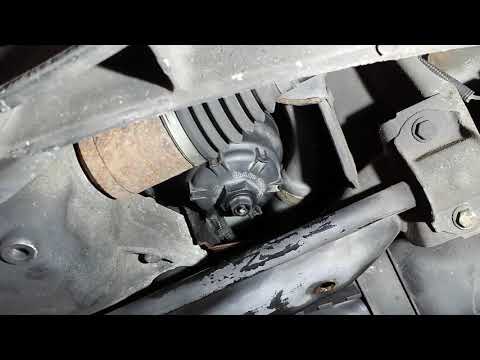
In this video, you will see where the fuel filter is located in a Volvo XC60 and how to proceed if you need to replace it. As shown, the filter is positioned at the lower part of the engine, right between the left half-shaft and the sway bar attachment. To replace the filter, first, go underneath the vehicle, taking all necessary safety precautions. Then, using an 18mm wrench, open the drain valve and allow any water present to escape. Next, unscrew the housing, remove the old filter, insert the replacement along with a new gasket, and reassemble everything. by ScegliAuto More videos
|
For advertising on this site Write to info@scegliauto.com
ScegliAuto is not responsible for any inaccuracy of the data in the lists. To report any inaccuracy or your business (if you own the business in question), please write to info@scegliauto.com
Number of seconds to generate the page: 0.838
(c) ScegliAuto 2026 - info@scegliauto.com - Privacy policy VAT number: IT01247470535 |
