
|
Do it yourself
| |||
| ||||


Instructions for Internal Fan Adjustment
Model: Vauxhall Vectra
Vectra C, MK 3
- Years:
2002, 2003, 2004, 2005, 2006, 2007, 2008
Video tutorial
If adjusting the speed of the internal fan does not change the airflow, there may be an issue with either the speed controller or the fan itself. To access the internal ventilation system, remove the glove compartment on the passenger side: open the door and unscrew the three screws along the upper inner edge; then move on to the two screws underneath and remove the glove compartment after disconnecting the internal light bulb connector. At this point, you can access the rear of the centre tunnel and remove the speed controller: it is a plate located just below the motor; once removed, check its functionality by inserting a bulb into the connector that goes to the motor: the brightness should increase as the fan speed setting increases. If the result is positive, then the problem lies with the fan: remove the front cover and check if the rotation is free or slightly obstructed; in the latter case, lubricate the fan until it rotates freely.
Updated on 13 February 2026 by ScegliAuto
Related tutorials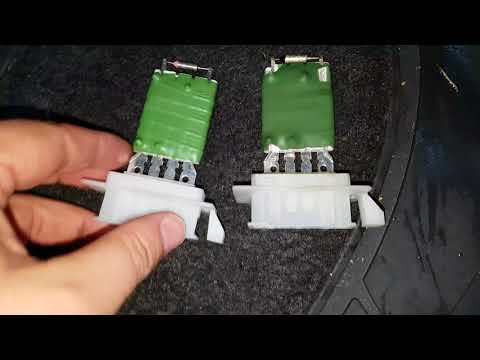
Vauxhall Vectra
(2002-2008 /
Vectra C, MK 3)
To remove the cabin ventilation fan from an Opel Vectra, use a lever to remove the plastic cover under the glove compartment. The cabin ventilation f…

Vauxhall Vectra
(2002-2008 /
Vectra C, MK 3)
Below are the instructions that will allow you to repair or replace the air vents on the Opel Vectra. First, get inside the cabin and start by removi…

Vauxhall Vectra
(2002-2008 /
Vectra C, MK 3)
Before proceeding with any bodywork repair, it is advisable to wash the area to identify all scratches and dents and assess the type of repair needed…
Other guides you may be interested in
|
How to Remove the Rear Seat of a Hyundai Tucson?
To remove the rear seat of a Hyundai Tucson, follow these steps. Start by moving the front seats to their most forward position to gain space. Next, locate the release lever on the underside of the rear seat, near the floor. Press this lever down while pulling the seat upwards to unlock it from the anchor pins. Once unlocked, tilt the seat upwards and forwards to remove it from its position. Repeat this process for both sides of the rear seat. Be careful of any electrical cables or components that may be connected to the seat during removal. Once the rear seat is removed, the disassembly is complete. by ScegliAuto More videos
|
|
For advertising on this site Write to info@scegliauto.com
ScegliAuto is not responsible for any inaccuracy of the data in the lists. To report any inaccuracy or your business (if you own the business in question), please write to info@scegliauto.com
Number of seconds to generate the page: 0.035
(c) ScegliAuto 2026 - info@scegliauto.com - Privacy policy VAT number: IT01247470535 |
