Toyota Yaris - Parking sensors
Parking Sensors Toyota Yaris (2011-2019 / xp 130)
Parking Sensors Toyota Yaris (2005-2011 / xp 90)
Cigarette lighter (3)
Airbag (5)
Alternator (2)
Shocks (5)
Air conditioning (6)
Car stereo (34)
Anti-roll bar (2)
Roof rack bars (1)
Battery (59)
Ignition coil (1)
Air vents (1)
Bushings (2)
Control arm (1)
Grille (1)
Transmission (8)
Spark plugs (18)
Body (16)
Wheel rim (1)
Key (56)
Trunk lock (1)
Timing belt (22)
V-belt (7)
Air conditioner (2)
A/C controls (5)
Onboard computer (14)
Checks and maintenance (84)
Dashboard (6)
Shifter boot (1)
Bearing (8)
MAF sensor (1)
Brake rotors (3)
Rear bench seat (2)
Side marker light (1)
Headlight (32)
Tail light (17)
Fog lights (6)
Air filter (25)
Cabin air filter (34)
Fuel filter (2)
Diesel fuel filter (6)
Oil filter (5)
Parking brake (5)
Clutch (8)
Fuel injectors (1)
Accessory kit (6)
Light bulb (10)
Side marker bulb (2)
Headlight bulb (51)
Tail light bulb (21)
Interior dome light bulb (11)
Antifreeze coolant (10)
License plate light (19)
(5)
Handle (2)
Exhaust muffler (2)
Engine (3)
Power window motor (5)
Starter motor (14)
Transmission fluid (3)
Engine oil (17)
Clock (63)
Door trim panel (28)
Front bumper (13)
Rear bumper (6)
Brake pads (12)
Tires (2)
Shift knob (13)
Pump (5)
Fuel pump (17)
Car door (1)
Instrument cluster (14)
Radiator (2)
Heater core (1)
Wheel (6)
Fuse box (150)
Seat (19)
Crankshaft position sensor (1)
Parking sensors (2)
Door lock (2)
Oxygen sensor (3)
Suspension system (2)
Side mirror (22)
Rearview mirror (1)
Warning light – error code (38)
(2)
Tire pressure warning light (106)
Service warning light (142)
Manufacturer emblem (1)
Engine mount (1)
Brake drums and shoes (5)
Fuel cap (12)
Windshield wipers (33)
Thermostat (4)
Drivetrain (1)
Center console tunnel (1)
Windshield washer nozzle (1)
Valve (1)
EGR valve (5)
Blower motor (2)
Side window (1)
Steering wheel (6)
|
Where is the battery located on the Aprilia Scarabeo 250ie scooter?
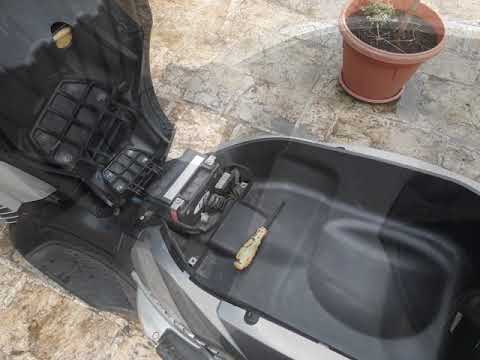
This video shows where the battery is located on the Aprilia Scarabeo 250ie scooter and how to proceed if you need to replace it. As shown, it is located beneath the seat. To access and replace it, first open the seat, then remove the plastic cover by unscrewing the relevant screws with a cross-head screwdriver. Next, disconnect both terminals, starting with the negative, remove the battery from its housing, and install the new replacement following the reverse procedure.
Watch the video!
by ScegliAuto
More videos
|



