
|
Do it yourself
| |||
| ||||


How to Replace the Remote Battery on a Volkswagen Jetta?
Model: Volkswagen Jetta
A7, MK 7
- Years 2018-2025
To replace the battery in the remote for a Volkswagen Jetta, slide the key out from inside the device to leverage it in its housing. This will allow you to detach the cover on the back of the device, revealing the underlying battery. The old battery can now be extracted from its housing and replaced with a new one; after replacing, close the device by reinserting the key into the top and ensure everything functions correctly.
Updated on 8 August 2026 by ScegliAuto
Video tutorial
Related tutorials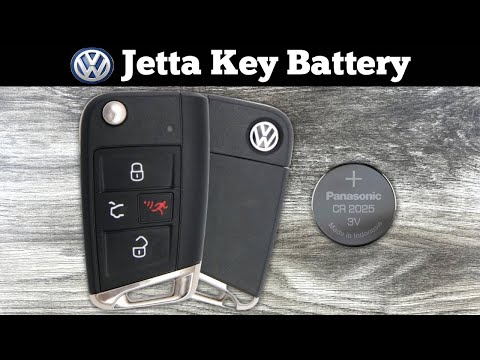
Volkswagen Jetta
(2018-2025 /
A7, MK 7)
To replace the battery of the Volkswagen Jetta remote, press the button on the top of the device to lift the key blade. Once lifted, pry inside its h…

Volkswagen Jetta
(2010-2018 /
MK 6, A6)
To replace the remote battery of the Volkswagen Jetta, press the button on the top of the device to lift the key. This will allow you to lever inside…

Volkswagen Jetta
(2010-2018 /
MK 6, A6)
Today's steps will show us how to disassemble and replace the battery of the Volkswagen Jetta key remote, as well as the Golf. First, let's take our …
Other guides you may be interested in
|
How to Reset the Tyre Pressure Light on the Opel Grandland X
While driving, if you notice the tyre pressure warning light coming on, first check the actual inflation pressure of the tyres and, if necessary, restore the pressures recommended by the manufacturer. After restoring the correct pressures, you need to reset the warning light that has illuminated on the instrument cluster. To do this, locate the reset button on the lower central console. Press this button and hold it down for at least 3 seconds, after which the low pressure indication will turn off. by ScegliAuto More videos
|
|
For advertising on this site Write to info@scegliauto.com
ScegliAuto is not responsible for any inaccuracy of the data in the lists. To report any inaccuracy or your business (if you own the business in question), please write to info@scegliauto.com
Number of seconds to generate the page: 0.163
(c) ScegliAuto 2026 - info@scegliauto.com - Privacy policy VAT number: IT01247470535 |
