
|
Do it yourself
| |||
| ||||


How do you reset the alarm on the Volvo XC90?
Model: Volvo Xc90
MK 2
- Years 2015-2026
When the alarm of the Volvo XC90 stops working or is experiencing abnormal functioning, it is likely that the module managing its operation is damaged: this will need to be replaced or it will be necessary to verify that all connections are intact. The module can be found inside the engine compartment, on the side corresponding to the left fender: once located, it will be necessary to disconnect the cables and loosen the screws that secure it to its brackets. In this way, it will be possible to verify that with the new module installed, the alarm functions correctly.
Posted on 20 October 2025 by ScegliAuto
Video tutorial
Related tutorials
Volvo Xc90
(2015-2026 /
MK 2)
This video tutorial explains how to disable the alarm on a Volvo XC90, not under normal operation of the key/remote, but when the battery is dead and…

Volvo Xc90
(2002-2014 /
MK 1)
The instructions outlined in this guide will allow us to reset the maintenance warning for the engine oil change of the Volvo XC90. First, let's get …

Volvo Xc90
(2015-2026 /
MK 2)
Here’s how to reset the tire pressure light on the Volvo XC90. Before recalibrating the TPMS sensors, ensure that all four tires are at the recommend…
Other guides you may be interested in
|
How to replace the horn on a Renault Duster - Dacia Duster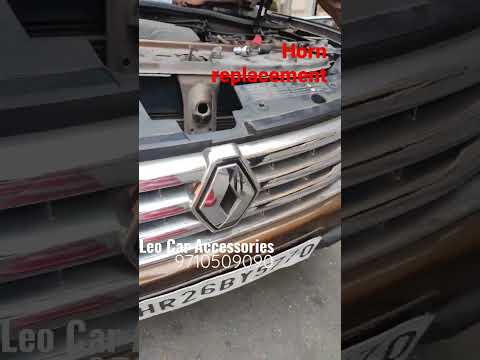
Today's main instructions will show you the procedure for removing and replacing the horn or sound signal on the Renault Duster, as well as the Dacia Duster. First, open the bonnet of the vehicle and start removing the front bumper by unscrewing all the fixing screws; you will find the horn right in front of the radiator, as shown in the video. At this point, disconnect the electrical connector and unscrew the bracket screw to remove and replace the horn with the new one; finally, reassemble the front bumper! by ScegliAuto More videos
|
|
For advertising on this site Write to info@scegliauto.com
ScegliAuto is not responsible for any inaccuracy of the data in the lists. To report any inaccuracy or your business (if you own the business in question), please write to info@scegliauto.com
Number of seconds to generate the page: 0.262
(c) ScegliAuto 2026 - info@scegliauto.com - Privacy policy VAT number: IT01247470535 |
