
|
Do it yourself
| |||
| ||||


How to Change a Headlight Bulb on a Citroen C4 Picasso
Model: Citroen C4
MK 2
- Years 2010-2018
If you notice that a headlight bulb on your vehicle is no longer functioning, you can proceed with its replacement by following the instructions in this description and referring to the video. The first step is to open the bonnet, locate the headlight with the blown bulb, remove the protective rear cover, and unscrew the bulb holder by turning it to the left. Once the bulb holder is extracted, disconnect the bulb and replace it with the new one, taking care not to touch the glass with your fingers. Finally, reinsert the bulb holder into the headlight, screw it back in, and then reposition the rear cover.
Updated on 24 May 2026 by ScegliAuto
Video tutorial
Related tutorials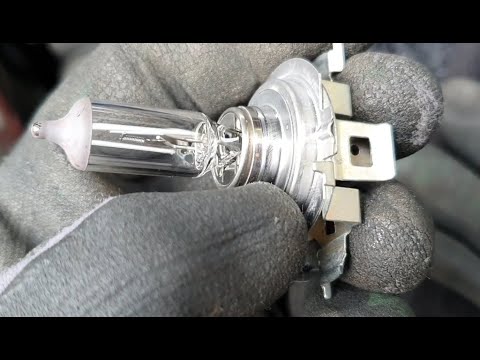
Citroen C4
(2010-2018 /
MK 2)
To replace the front headlamp bulb on a Citroën C4, open the bonnet to access the internal part of the corresponding headlamp. Disconnect the circula…

Citroen C4
(2004-2010 /
MK 1)
Open the bonnet by pulling the lever located at the bottom right of the dashboard and secure it with the prop rod. Remove the inspection cover from t…

Citroen C4
(2020-2026 /
MK 3)
Replacing the side turn signal bulb of the Citroen C4 Picasso is a simple and quick operation to be carried out independently. The cost of the bulb, …
Other guides you may be interested in
|
How to Open the Bonnet on the Lancia Y
To open the bonnet on this vehicle, follow these simple instructions: first, open the driver's door and locate the lever positioned just below the dashboard, marked with an image of the vehicle with the bonnet open. Pull this lever towards you until you hear a "click" indicating the bonnet is released. Next, exit the cabin and stand in front of the bonnet to disengage the safety catch and complete the opening. To do this, slightly lift the bonnet, locate the yellow lever underneath, and pull it to the left to fully release and open the bonnet. by ScegliAuto More videos
|
|
For advertising on this site Write to info@scegliauto.com
ScegliAuto is not responsible for any inaccuracy of the data in the lists. To report any inaccuracy or your business (if you own the business in question), please write to info@scegliauto.com
Number of seconds to generate the page: 0.483
(c) ScegliAuto 2026 - info@scegliauto.com - Privacy policy VAT number: IT01247470535 |
