
|
Do it yourself
| |||
| ||||


Citroen C4 - Video guides Citroen C4 (2020-2026 / )
How to Reset the Service Light on the Citroën C4? The Service light displayed on the instrument panel of the Citroën C4 can be completely cleared from the panel by holding down the button located at the end …Read all… Posted on 9 October 2026 by ScegliAuto  Citroen C4 (2004-2010 / MK 1)
How to reset the Service light on the Citroën C4? To completely turn off the Service light that appears on the instrument panel of the Citroën C4, press and hold the TRIP button located under the central …Read all… Posted on 8 October 2026 by ScegliAuto  Citroen C4 (2020-2026 / MK 3)
How to Reset the Service Light on a Citroen C4 In this guide, we will discover the instructions that will allow us to reset the service light for the regular maintenance of the engine oil change on the …Read all… Posted on 3 October 2026 by ScegliAuto  Citroen C4 (2020-2026 / MK 3)
How to reset the tyre pressure warning light on a Citroën C4? To completely clear the tyre pressure warning light on a Citroën C4, it will be necessary to inflate the tyres to the optimal pressure value indicated on the …Read all… Posted on 25 September 2026 by ScegliAuto  Citroen C4 (2020-2026 / MK 3)
How to Disable the Start and Stop System on the Citroen C4 In this article, you will learn how to activate or deactivate the start and stop system of the Citroen C4. The procedure is useful in case of a flat car …Read all… Posted on 25 September 2026 by ScegliAuto  Citroen C4 (2020-2026 / MK 3)
Resetting the Oil Change on a Citroen C4 In today's video, we will see how to reset the engine oil change light on a Citroen C4, third generation model produced from 2019 onwards. So, let's start the …Read all… Posted on 17 September 2026 by ScegliAuto  Citroen C4 (2004-2010 / MK 1)
How to Replace the Gear Knob on a Citroen C4? In this tutorial, see how to replace the gear knob on a Citroen C4. This operation is very simple and quick. First, separate the base of the gaiter from the …Read all… Posted on 15 September 2026 by ScegliAuto  Citroen C4 (2014-2020 / Cactus)
How to change the battery on the Citroen C4 Cactus Let's see how to replace the battery on the Citroen C4 Cactus: open the bonnet and disconnect the negative terminal of the battery, moving the clamp away from …Read all… Posted on 15 September 2026 by ScegliAuto  Citroen C4 (2004-2010 / MK 1)
How to Turn Off the Service Light on a Citroen C4? To cancel the service reminder light on a Citroen C4, you can do it yourself, so no need for a garage or electronic tools to connect, etc. After performing the …Read all… Posted on 13 September 2026 by ScegliAuto  Citroen C4 (2020-2026 / MK 3)
How to Activate/Deactivate the Start/Stop System in a Citroen C4 To activate or deactivate the Start/Stop system on a Citroen C4 2025, start the vehicle and use the central touchscreen display. Open the menu dedicated to …Read all… Posted on 10 September 2026 by ScegliAuto  Citroen C4 (2004-2010 / MK 1)
How to Replace the Front Headlamp Bulb on a Citroen C4 To replace the front headlamp bulb on a first-generation Citroen C4, turn off the lights, open the bonnet and reach the back of the affected headlamp unit. …Read all… Posted on 7 September 2026 by ScegliAuto  Citroen C4 (2020-2026 / MK 3)
How to Replace the Cabin Air Filter in a Citroen C4 To replace the cabin air filter in a Citroen C4, turn off the engine and open the bonnet. The pollen filter is accessible from the engine bay, at the base of …Read all… Posted on 3 September 2026 by ScegliAuto  Citroen C4 (2010-2018 / MK 2)
How to Change the Engine Oil and Filter on a Citroen C4 MK2? Start the oil and filter change, which is the basic service, on a Citroen C4 MK2 by ensuring the car is off and parked safely. Unscrew the oil filler cap, then …Read all… Posted on 3 September 2026 by ScegliAuto  Citroen C4 (2010-2018 / MK 2)
How to Remove the Centre Console of the Citroën C4 Removing the centre console on the Citroën C4 requires attention. Use a plastic tool to pry up the top edge of the panel and detach it. Remove the air vent …Read all… Posted on 28 August 2026 by ScegliAuto  Citroen C4 (2010-2018 / MK 2)
How to Reset the Service Light on the Citroen C4? In this tutorial, you will see how to reset the service light on the Citroen C4, a very simple and quick operation to perform only after completing all …Read all… Posted on 27 August 2026 by ScegliAuto  Citroen C4 (2010-2018 / MK 2)
How to Replace the Rear Shock Absorbers on a Citroen C4 On a Citroen C4, replacing the rear shock absorbers is a typical task when the rear end becomes softer, the car bounces over bumps, or there are sharp noises …Read all… Posted on 26 August 2026 by ScegliAuto  Citroen C4 (2010-2018 / MK 2)
Where to Find the Crankshaft Position Sensor on a Citroen C4 In this video, we can see where the crankshaft position sensor is located on a Citroen C4, for models with a 1.6 HDi engine. The sensor is located on the right …Read all… Posted on 25 August 2026 by ScegliAuto  Citroen C4 (2014-2020 / Cactus)
How to Change the Battery in a Citroen C4 Cactus Remote Let's see how to change the battery in the remote of a Citroen C4 Cactus: you will only need a thin flathead screwdriver. Look at the remote from the back. The …Read all… Posted on 24 August 2026 by ScegliAuto  Citroen C4 (2010-2018 / MK 2)
How to Locate the Fuses in a Citroen C4 To locate the fuses in a second-generation Citroen C4, check the main points of the electrical system. The first fuse box is located in the cabin, at the …Read all… Posted on 20 August 2026 by ScegliAuto  Citroen C4 (2014-2020 / Cactus)
The Coil Spring Breaks and Destroys a Tyre on a Citroen C4 The issue described in the video is a dangerous yet rare failure that must be known: the breakage of a coil spring on a Citroen C4 Cactus has punctured the …Read all… Posted on 20 August 2026 by ScegliAuto
Airbag (5)
Speaker (5)
Shocks (6)
Antenna (1)
Car stereo (21)
Battery (24)
Transmission (4)
Body (6)
Glove compartment (2)
Control unit (4)
Key (32)
Trunk lock (3)
Timing belt (8)
Air conditioner (2)
A/C controls (1)
Onboard computer (15)
Checks and maintenance (25)
Dashboard (12)
Shifter boot (2)
Brake rotors (2)
Headlight (4)
Tail light (6)
Fog lights (3)
Diesel particulate filter (3)
Air filter (17)
Cabin air filter (19)
Diesel fuel filter (8)
Oil filter (3)
Clutch (5)
Fuel injectors (1)
Accessory kit (2)
Light bulb (1)
Side marker bulb (1)
Headlight bulb (16)
Tail light bulb (8)
Interior dome light bulb (1)
License plate light (1)
(1)
Handle (1)
Engine (8)
Power window motor (1)
Starter motor (1)
Transmission fluid (1)
Brake fluid (1)
Engine oil (7)
Clock (32)
Door trim panel (21)
Front bumper (7)
Rear bumper (1)
Brake pads (5)
Tires (1)
Shift knob (11)
Pump (1)
Fuel pump (2)
Car door (3)
Push button (1)
Instrument cluster (6)
Heater core (1)
Wheel (1)
Fuse box (46)
Seat (5)
Crankshaft position sensor (1)
Engine coolant temperature sensor (1)
Door lock (4)
Suspension system (1)
Side mirror (10)
Rearview mirror (1)
AdBlue warning light (6)
Warning light – error code (22)
(36)
Tire pressure warning light (7)
Service warning light (108)
Manufacturer emblem (1)
Fuel cap (3)
Windshield wipers (3)
Thermostat (5)
Cylinder head (1)
Windshield washer nozzle (1)
EGR valve (2)
Blower motor (6)
|
See also:
AdBlue Tank Fault on Peugeot 2008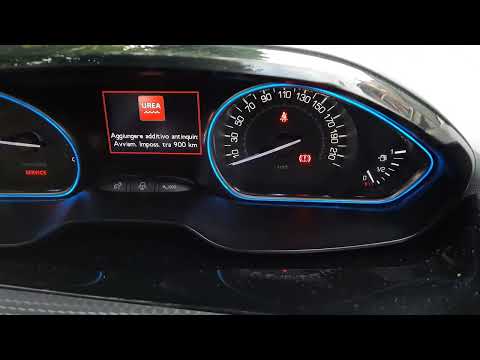
If the instrument cluster of your Peugeot 2008 sends an alarming signal as seen in the video, despite having just filled the AdBlue tank, the problem is not that the tank needs replacing - as authorised workshops simplistically suggest - at a cost of around £1,000. The first thing to do is to remember not to wait for the system to remind you that you are low on AdBlue, but to refill it every 5,000 to 6,000 miles, as the fault lies in the measurement of the tank level. Another good practice is to add an additive (yes, an additive in the additive) such as Tunap 988 (£23.99 on Amazon, with free delivery) which will prevent the AdBlue from crystallising. by ScegliAuto More videos
|
|
For advertising on this site Write to info@scegliauto.com
ScegliAuto is not responsible for any inaccuracy of the data in the lists. To report any inaccuracy or your business (if you own the business in question), please write to info@scegliauto.com
Number of seconds to generate the page: 0.014
(c) ScegliAuto 2026 - info@scegliauto.com - Privacy policy VAT number: IT01247470535 |
