
|
Do it yourself
| |||
| ||||


Replacement of Front Brake Pads
Model: Ford Focus
MK 1
- Years:
1998, 1999, 2000, 2001, 2002, 2003, 2004
Video tutorial
Lift the vehicle on suitable axle stands and remove the front wheel. Remove the protective caps over the retaining bolts of the caliper from its bracket and unscrew them to remove the caliper. Extract the old pads, clean the caliper retaining bolts of any dirt residue, and lubricate them with copper grease. Apply grease to the back of the pads and on the sliding plates. Retract the caliper piston and reassemble in reverse order. Pump the brake pedal until it offers the correct resistance and pay attention during the first braking.
Updated on 15 February 2026 by ScegliAuto
Related tutorials
Ford Focus
(2011-2018 /
MK 3)
To replace the front brake pads, lift the vehicle on appropriate axle stands, remove the front wheel, and before starting to disassemble the caliper,…

Ford Focus
(1998-2004 /
MK 1)
Replacing the brake pads is a maintenance task that you can certainly do yourself, but with the right precautions as brakes are a crucial safety elem…
Ford Focus
(2011-2018 /
MK 3)
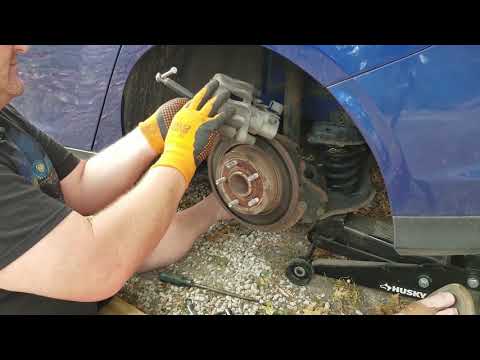
Replacing the rear brake pads? Here's how to remove the pads on the Focus brakes. Lift the car on a column lift to the desired height, then remove th…
Other guides you may be interested in
|
How to Reset the Tire Pressure Light on a MG ZS?
On the instrument cluster of the MG ZS, the tire pressure light that appears can be reset by inflating the tires to the correct pressure: this value will be indicated on the sticker attached to the driver's door pillar. Once the tires have been properly inflated, you can turn on the instrument cluster and navigate through the menu until you find the option that indicates tire pressure: if this screen shows the new values, the light will turn off; otherwise, you will need to drive for a few miles so that the sensors can read the new values and turn off the light afterward. by ScegliAuto More videos
|
|
For advertising on this site Write to info@scegliauto.com
ScegliAuto is not responsible for any inaccuracy of the data in the lists. To report any inaccuracy or your business (if you own the business in question), please write to info@scegliauto.com
Number of seconds to generate the page: 0.090
(c) ScegliAuto 2026 - info@scegliauto.com - Privacy policy VAT number: IT01247470535 |
