
|
Do it yourself
| |||
| ||||


How to replace the fuel pump in the Mitsubishi Lancer?
Model: Mitsubishi Lancer
MK 8
- Years 2000-2006
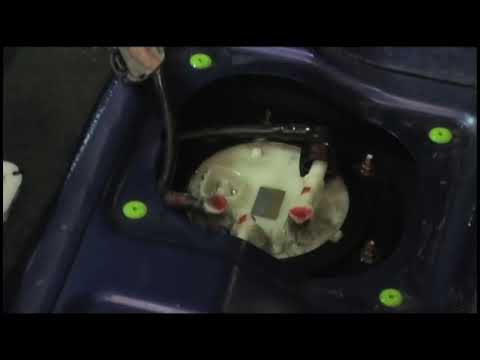
In this tutorial we can see how to replace the fuel pump in the Mitsubishi Lancer, an extremely simple and quick operation. First of all, make sure that the key is not inserted, so that you can work in complete safety, then open the rear doors and lift the seat of the sofa. Then open the large central cap by unscrewing the relevant fastening screws, disconnect both the power connector and the two fuel pipes, and, with an 8mm socket wrench, unscrew the bolts along the perimeter of the pump. Finally, extract the pump, insert the replacement, and reassemble everything.
Posted on 14 August 2024 by ScegliAuto
Video tutorial
Related tutorials
Mitsubishi Lancer
Fitting tuning eyelids on front headlights. …

Mitsubishi Lancer
(1995-2000 /
MK 7)
In this video, you can see where the fuel filter is located in the Mitsubishi Lancer EVO and how to proceed if you need to replace it. As shown, the …
Mitsubishi Lancer
(2000-2006 /
MK 8)
The fuel pump is installed directly in the tank and is fully immersed in fuel: usually, when the ignition is turned on, a whirring sound is heard fro…
Other guides you may be interested in
|
Fuses Location and Diagram for the Volkswagen Crafter
In this guide, we will look at the location of the fuse boxes and how to find their diagram for the Volkswagen Crafter. First, get inside the vehicle and start by removing the plastic cover found under the steering wheel, to access the internal fuse box; you will find another fuse box in the engine compartment by removing the plastic cover located next to the battery. At this point, use the owner's manual to find the fuse diagram, which will allow you to identify and replace any blown fuses with new ones! by ScegliAuto More videos
|
|
For advertising on this site Write to info@scegliauto.com
ScegliAuto is not responsible for any inaccuracy of the data in the lists. To report any inaccuracy or your business (if you own the business in question), please write to info@scegliauto.com
Number of seconds to generate the page: 0.138
(c) ScegliAuto 2026 - info@scegliauto.com - Privacy policy VAT number: IT01247470535 |
