
|
Do it yourself
| |||
| ||||


Replacement of Front Brake Pads
Model: Vauxhall Vectra
Vectra C, MK 3
- Years:
2002, 2003, 2004, 2005, 2006, 2007, 2008
Video tutorial
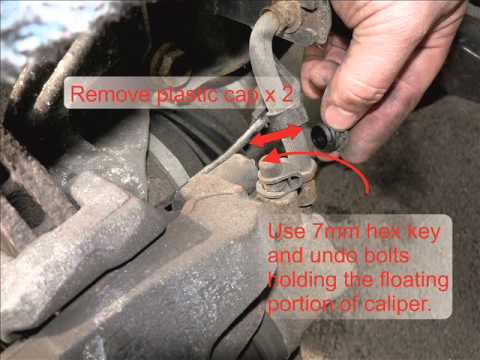
Remove the plastic covers from the wheel bolts and unscrew the nuts. Lift the vehicle and detach the brake caliper by removing the two spring clips with pliers. Remove the two plastic covers and use a 7mm hex key to free the cylinder from both sides. Clean the edge of the disc and retract the cylinder. Replace the pads, ensuring not to damage the cylinder's position. Release the fluid into the piston and reposition the cylinder. Realign the piston by pushing it inwards and check the adherence of the pads to the disc. Refit the springs and check the brake fluid level, topping it up if necessary.
Updated on 8 February 2026 by ScegliAuto
Related tutorials
Vauxhall Vectra
(1995-2002 /
Vectra B, MK 2)
Lift the vehicle on a ramp or suitable axle stands; then remove the front wheel, take off the protective caps from the brake caliper mounting pins, a…
Vauxhall Vectra
(2002-2008 /
Vectra C, MK 3)
Remove the plastic covers from the wheel bolts and unscrew the nuts. Lift the vehicle and remove the brake caliper by taking off the two spring clips…
Vauxhall Vectra
(2002-2008 /
Vectra C, MK 3)
Brake pads play a crucial role in vehicle safety, making it essential to keep them in perfect condition. Regular maintenance of your car is necessary…
Other guides you may be interested in
|
How to Reset the Tyre Pressure Warning Light on a Kia Rio?
The tyre pressure warning light displayed on the instrument cluster of the Kia Rio can be reset by inflating the tyres until they reach the recommended pressure value: this value is indicated on the sticker affixed to the driver's door pillar. Once all tyres have been inflated to the recommended pressure, turn on the ignition to check that the light has disappeared: if it is still present, it may be necessary to drive for a few miles, allowing the sensors to work and thus turning off the light. by ScegliAuto More videos
|
|
For advertising on this site Write to info@scegliauto.com
ScegliAuto is not responsible for any inaccuracy of the data in the lists. To report any inaccuracy or your business (if you own the business in question), please write to info@scegliauto.com
Number of seconds to generate the page: 0.117
(c) ScegliAuto 2026 - info@scegliauto.com - Privacy policy VAT number: IT01247470535 |
