
|
Do it yourself
| |||
| ||||


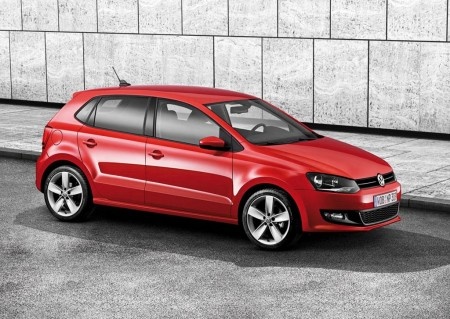
How to Replace the Rear Light Bulb on a 2014 Polo 5
Model: Volkswagen Polo
6R, Polo V, MK V, Polo 5, MK 5
- Years:
2009, 2010, 2011, 2012, 2013, 2014, 2015, 2016, 2017
Video tutorial
In this video, you will learn how to replace the rear light bulb on a 2014 Polo 5. To begin, ensure the car is off and pull the handbrake. To avoid damaging the bulbs, never touch the glass part with your fingers or clean it well with absorbent paper before reassembling everything. Open the boot and detach the boot carpet to access the rear light housing. Now, manually unscrew the plastic butterfly that holds the light tight to the bodywork. Once done, take a flathead screwdriver and gently release the light from its housing (use a cloth to avoid damaging the bodywork). Remove the connector and then the plastic cover as indicated in the video. At this point, replace the bulb and reassemble everything.
Updated on 3 July 2026 by ScegliAuto
Related tutorials
Volkswagen Polo
(2009-2017 /
6R, Polo V, MK V, Polo 5, MK 5)
Before starting, open the rear hatch of your Volkswagen Polo. Begin by moving the carpet flap located on the inner side of the boot. Next, unscrew an…

Volkswagen Polo
(2009-2017 /
6R, Polo V, MK V, Polo 5, MK 5)
How do you replace the bulbs in the rear headlamp on a Volkswagen Polo? This operation is very simple. Follow these steps: open the boot lid, then re…

Volkswagen Polo
(2001-2009 /
Polo IV, MK IV, Polo 4, MK 4, 9N)
In today's tutorial, you will learn how to remove and replace the front fog light bulb on a second-generation Volkswagen Polo. First, remove the fog …
ScegliAuto offers an extensive international collection of automotive tutorials available in 12 languages. Each guide combines instructional videos with original explanations written by experienced human editors, along with information about the car models covered.
Other guides you may be interested in
|
What does the red or orange zig-zag warning light mean on the Dacia Sandero?
In this video, you will learn what the warning light depicting a red or orange zig-zag on the dashboard of the Dacia Sandero means. This is a multifunction warning light; if it appears red, it is a prompt to stop as soon as possible, switch off the engine, and exit the vehicle quickly, contacting a recovery service and the Dacia Dealer. If it lights up orange, it indicates an electronic fault in the vehicle; you can continue driving, but you must reach a Dacia service centre as soon as possible. If it lights up alongside the spanner symbol, it means it is time for a service, which is due every year or 10,000 miles (whichever comes first). The service is mandatory to maintain the warranty. If it lights up together with the tyre warning light, it indicates a loss of pressure in one of the tyres. You should check all the tyres as soon as possible to identify the source of the pressure loss. If it stays on with the engine warning light, it indicates a problem with the vehicle's emissions system; if it flashes, the issue may be a component of the engine, such as the spark plugs or coil, for example. On diesel versions, it may light up alongside the glow plug symbol, indicating a related issue. If it lights up with the ESP symbol, it means there is a fault in the system that needs checking. by ScegliAuto More videos
|
|
For advertising on this site Write to info@scegliauto.com
ScegliAuto is not responsible for any inaccuracy of the data in the lists. To report any inaccuracy or your business (if you own the business in question), please write to info@scegliauto.com
Number of seconds to generate the page: 0.029
(c) ScegliAuto 2026 - info@scegliauto.com - Privacy policy - About us VAT number: IT01247470535 |
