
|
Do it yourself
| |||
| ||||


How do you reset the brake wear indicator on a BMW Series 3?
Model: BMW Serie 3
E92, E90, E91
- Years 2005-2013
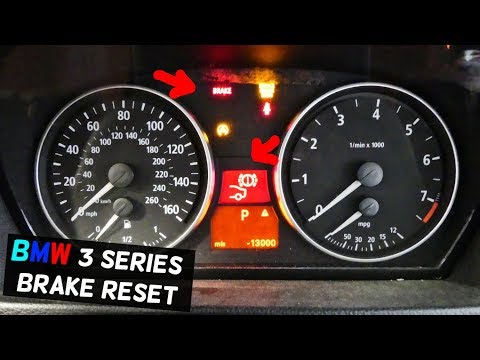
It will be possible to completely make the brake wear warning light of the BMW Series 3 disappear by turning on the instrument panel and pressing the appropriate button located to the right of the steering wheel. This way, you can navigate through the menu that will be displayed on the panel by repeatedly pressing the BC button on the lever to the left until the range appears. Now, you need to hold down the button on the left of the panel until the icon of the car with the brake wear warning light appears. While holding down the BC button, you can now reset the warning light and then turn off the panel.
Posted on 4 January 2026 by ScegliAuto
Video tutorial
Related tutorials
BMW Serie 3
(1998-2006 /
E46)
It will be possible to completely clear the brake wear warning light on the BMW Series 3 by turning on the instrument cluster, allowing you to naviga…

BMW Serie 3
(2019-2026 /
G20)
On the instrument panel of the BMW 3 Series, the operation of resetting the brake wear indicator light involves turning on the instrument panel, so t…
BMW Serie 3
(2005-2013 /
E92, E90, E91)
Let's see in this guide how to reset the brake wear warning light on the BMW 3 Series, following the instructions below. First of all we get in the c…
Other guides you may be interested in
|
Replacing the Battery of a Mercedes C-Class Key Fob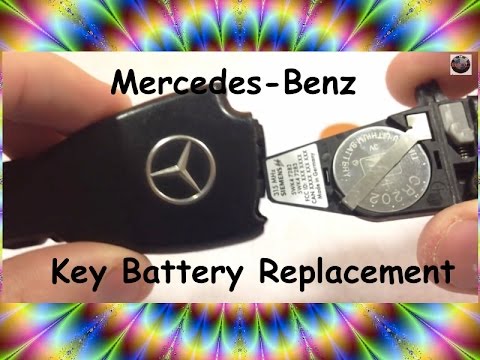
Are you replacing the battery of a Mercedes C-Class key fob? Here's how to do it: Take your key fob and slide the button to release the metal key. Once the key is out, use a lever to pry the battery holder from the cover (as shown in the video). Remove the battery from the compartment (use a small screwdriver), take a new one of the same size and voltage. Reinstall the plastic battery holder into the key fob cover, and finally insert the metal key back into the cover. Check that the key fob works correctly. by ScegliAuto More videos
|
|
For advertising on this site Write to info@scegliauto.com
ScegliAuto is not responsible for any inaccuracy of the data in the lists. To report any inaccuracy or your business (if you own the business in question), please write to info@scegliauto.com
Number of seconds to generate the page: 0.074
(c) ScegliAuto 2026 - info@scegliauto.com - Privacy policy VAT number: IT01247470535 |
