
|
Do it yourself
| |||
| ||||


In the Land Rover Discovery Sport, how do you reset the Service light?
Model: Land Rover Discovery
Discovery 4, MK 4, LR4
- Years 2010-2016
The achievement of the mileage stored in the control unit related to the Service will cause the warning light to turn on in the instrument panel. If the aforementioned mileage is not reached, we will still need to service the vehicle by replacing the oil and the oil filter, as a certain amount of time has passed. But after performing this intervention, how do we cancel the warning? Here’s the solution: turn on the instrument panel, open the driver's door, keep the accelerator and brake pedals pressed, wait a few seconds for the alarm to reset, and then release the mentioned pedals and turn off the panel.
Posted on 29 December 2025 by ScegliAuto
Video tutorial
Related tutorials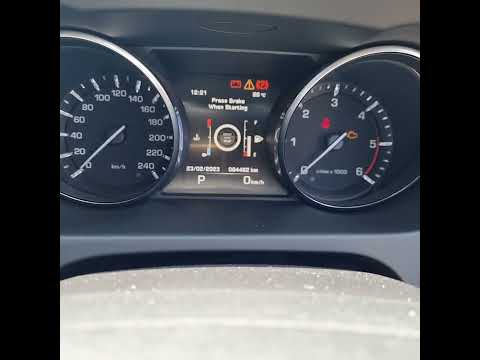
Land Rover Discovery
(2017-2024 /
L462, Discovery 5, MK 5)
If the service light on the instrument panel of your 2017 Land Rover Discovery Sport Mk5 stays on even after you have recently serviced it, don't wor…

Land Rover Discovery
(2010-2016 /
Discovery 4, MK 4, LR4)
In this tutorial we can see how to reset the service in the Land Rover Discovery Sport, an extremely simple and fast operation, to be carried out onl…

Land Rover Discovery
(2017-2024 /
L462, Discovery 5, MK 5)
The procedure for resetting the service light on the Land Rover Discovery Sport is really very simple to perform, within everyone's reach and without…
Other guides you may be interested in
|
How to Open a Stuck Boot on the Peugeot 407?
On the Peugeot 407, the boot may become stuck, possibly due to a problem with the control button or the lock actuator. In such cases, you can perform an emergency opening by following the simple procedure shown in this tutorial. First, open the rear doors, then lower the seat back by operating the release lever. Next, go inside the boot, locate the lock, and manually operate it using a flathead screwdriver. The boot will then be free to open. by ScegliAuto More videos
|

|
For advertising on this site Write to info@scegliauto.com
ScegliAuto is not responsible for any inaccuracy of the data in the lists. To report any inaccuracy or your business (if you own the business in question), please write to info@scegliauto.com
Number of seconds to generate the page: 0.059
(c) ScegliAuto 2026 - info@scegliauto.com - Privacy policy VAT number: IT01247470535 |
