
|
Do it yourself
| |||
| ||||


Resetting the DPF Warning Light on a Mazda 6 2.0 Diesel
Model: Mazda 6
GG, MK 1
- Years:
2002, 2003, 2004, 2005, 2006, 2007, 2008
Video tutorial
In this video tutorial, learn how to reset the DPF (Diesel Particulate Filter) warning light on a Mazda 6, following the steps outlined below. First, open the bonnet and access the fuse box by removing the plastic cover; then connect the clamp to the appropriate socket and the other end to the ground (also on the car body). At this point, start the vehicle and repeatedly press the accelerator pedal to regenerate the DPF and reset the warning light, as shown in the video.
Updated on 24 April 2026 by ScegliAuto
Related tutorials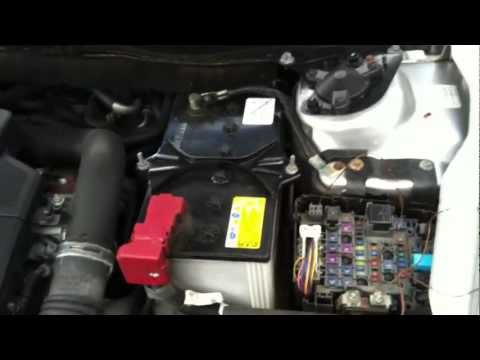
Mazda 6
(2008-2012 /
MK 2, GH)
In this video tutorial, you will learn how to reset the diesel particulate filter (DPF) light on the second generation Mazda 6. First, open the bonne…

Mazda 6
(2012-2024 /
GJ, MK 3)
Reset the tyre warning light on a Mazda 6, as shown in this tutorial, is an extremely simple and quick operation. Before proceeding, ensure you have …

Mazda 6
(2012-2024 /
GJ, MK 3)
To reset the service light on a Mazda 6, turn on the instrument panel without starting the engine, then use the buttons on the left side of the steer…
Other guides you may be interested in
|
How to Reset the Tyre Pressure Warning Light on the Jeep Renegade?
To reset the tyre pressure warning light on the Jeep Renegade, inflate the tyres until they reach the recommended pressure: this value is indicated on the sticker attached to the driver’s door pillar. Once the tyres are properly inflated, navigate through the menu that appears on the instrument cluster until you find the tyre pressure option. At this point, press and hold the OK button on the right side of the steering wheel to make the warning light disappear. by ScegliAuto More videos
|
|
For advertising on this site Write to info@scegliauto.com
ScegliAuto is not responsible for any inaccuracy of the data in the lists. To report any inaccuracy or your business (if you own the business in question), please write to info@scegliauto.com
Number of seconds to generate the page: 0.100
(c) ScegliAuto 2026 - info@scegliauto.com - Privacy policy VAT number: IT01247470535 |
