
|
Do it yourself
| |||
| ||||


Resetting the service light on the Mazda 2 MK3.
Model: Mazda 2
MK 3, DJ
- Years 2014-2023
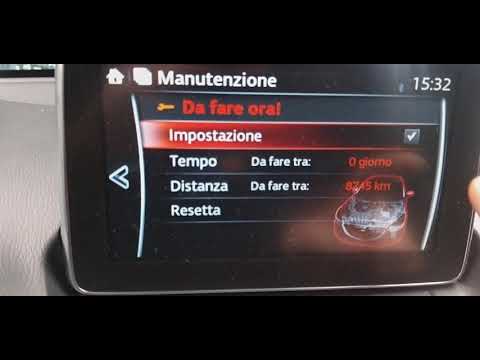
In this video, we see how the orange wrench-shaped warning light on the Mazda 2's instrument panel reminds us of the need to change the engine oil. Once the operation is completed, we reset the module that handles notifications. Sitting at the wheel of the car, we turn on the instrumentation, use the controls on the central tunnel to press the Home button and select the Applications menu on the display in the center of the dashboard. Next, we choose Maintenance and then Programming, scroll to Reset and confirm the reset on the next screen to complete the operation.
Posted on 14 May 2024 by ScegliAuto
Video tutorial
Related tutorials
Mazda 2
(2014-2023 /
MK 3, DJ)
To reset the Service light of the Mazda 2, you need to turn on the instrument panel so that you can navigate through the menu that will be displayed …

Mazda 2
(2014-2023 /
MK 3, DJ)
To manually reset the service light on the instrument panel of your Mazda 2, you need just a few seconds. Below we explain the steps you need to foll…
Mazda 2
(2014-2023 /
MK 3, DJ)
This video shows, along with a verbal description, the procedure to reset the service light, identifiable by the flashing spanner symbol. After turni…
Other guides you may be interested in
|
How to Replace the Cabin Filter on the Opel Grandland X
If you own an Opel Grandland X and want to know the steps to replace the cabin air filter, carefully read the following guide and follow the described steps. First, enter the vehicle and go to the passenger side. Then, locate the box containing the air filter in the lower side area of the dashboard. Remove the cover of the box and finally replace the old filter with the new one. Refit the cover, and you are done. by ScegliAuto More videos
|

|
For advertising on this site Write to info@scegliauto.com
ScegliAuto is not responsible for any inaccuracy of the data in the lists. To report any inaccuracy or your business (if you own the business in question), please write to info@scegliauto.com
Number of seconds to generate the page: 0.800
(c) ScegliAuto 2026 - info@scegliauto.com - Privacy policy VAT number: IT01247470535 |
