Do it yourself
Frequently asked questions about cars and motorcycles
  1. Car
  2. :
  3. Mercedes
  4. :
  5. Classe E
  6. : 2023-2026 (W214)

2023-2026 Mercedes Classe E (W214)

Tutorial - For model years: 2023, 2024, 2025, 2026
Mechanics (2)
Electrical System and Lighting (1)
Interior and Accessories (3)
Vehicle Controls and Functions (6)
Mercedes Classe E (2023-2026 / W214)
How to Replace the Key Fob Battery on a Mercedes E-Class

You can replace the battery in the key fob of a Mercedes E-Class by pressing the button on the back of the device, which will release the key inside: once this …Read all…
Posted on 27 October 2026 by ScegliAuto
Mercedes Classe E (2023-2026 / W214)
How to Reset the Maintenance Light on a Mercedes E-Class

To reset the maintenance light on a latest generation Mercedes E-Class, get in the vehicle and turn on the instrument cluster without starting the engine. Use …Read all…
Posted on 5 September 2026 by ScegliAuto
Mercedes Classe E (2023-2026 / W214)
Where is the Engine Fuse Box in the Mercedes E-Class W214?

If you need to access the engine fuses in your Mercedes E-Class W214 but don't know where the fuse box is located, follow the procedure described below. First, …Read all…
Posted on 23 June 2026 by ScegliAuto
Mercedes Classe E (2023-2026 / W214)
How to Reset the Service Light on the Mercedes E-Class W214

Let's see how to reset the service light on a Mercedes E-Class W214. Turn on the ignition, press the "home" button on the control panel to the left of the …Read all…
Posted on 29 May 2026 by ScegliAuto
Mercedes Classe E (2023-2026 / W214)
How to Reset the TPMS Light on a Mercedes E-Class

To reset the TPMS light on a Mercedes E-Class, turn on the ignition without starting the engine. On the steering wheel or the instrument cluster display, …Read all…
Posted on 27 February 2026 by ScegliAuto
Mercedes Classe E (2023-2026 / W214)
How to reset the onboard computer in the Mercedes E-Class?

In this tutorial, we will see how to reset the onboard computer in the Mercedes E-Class, a very simple and quick operation that can be performed, for example, …Read all…
Posted on 13 December 2025 by ScegliAuto
Mercedes Classe E (2023-2026 / W214)
How do you use the adaptive cruise control on the Mercedes E450?

Let's see how cruise control is used in the Mercedes E450: all functions are controlled from the left side of the steering wheel. Press the button with the …Read all…
Posted on 11 October 2025 by ScegliAuto
Mercedes Classe E (2023-2026 / W214)
How do you deactivate the passenger side airbag in Mercedes cars?

In response to the question at hand, we refer to the latest generation Mercedes cars, such as the E-Class shown in the video uploaded here. It is not possible …Read all…
Posted on 2 September 2025 by ScegliAuto
Mercedes Classe E (2023-2026 / W214)
How to open the fuel door of a Mercedes E-Class W124 in case of emergency

In this video we can see how to emergency open the fuel cap of a Mercedes E-Class W124 version: first of all, we need to make sure that all the doors are …Read all…
Posted on 14 July 2025 by ScegliAuto
Mercedes Classe E (2023-2026 / W214)
How to reset the "Service" indicator on a Mercedes E-Class?

To reset the "Service" light on a Mercedes E-Class, turn on the instrument panel without starting the engine. Use the buttons on the steering wheel to access …Read all…
Posted on 25 June 2025 by ScegliAuto
Mercedes Classe E (2023-2026 / W214)
How to replace the battery of the key for the Mercedes E-Class W214

If you own a Mercedes E-Class W214 and want to replace the battery inside the car key yourself, all you have to do is read the following guide and follow all …Read all…
Posted on 23 February 2025 by ScegliAuto
Mercedes Classe E (2023-2026 / W214)
How to Open the Fuel Door on a Mercedes E-Class?

In this tutorial, you will see how to open the fuel door on a Mercedes E-Class, a very simple operation that follows the typical procedure for most vehicles. …Read all…
Posted on 25 September 2026 by ScegliAuto
Cigarette lighter (1) Airbag (7) Alternator (4) Speaker (11) Shocks (7) Antenna (1) Air conditioning (2) Car stereo (18) Anti-roll bar (1) Battery (43) Air vents (4) Control arm (3) Transmission (15) Spark plugs (3) Glow plugs (7) Convertible top (1) Body (16) Glove compartment (2) Control unit (7) Key (43) Trunk lock (1) Timing belt (10) V-belt (2) Air conditioner (17) A/C controls (8) Onboard computer (18) Checks and maintenance (78) Dashboard (17) Bearing (1) Brake rotors (2) Rear bench seat (2) Electric cooling fan (1) Side marker light (2) Headlight (18) Tail light (8) Fog lights (1) Air filter (12) Cabin air filter (19) Fuel filter (2) Diesel fuel filter (4) Oil filter (4) Parking brake (4) Grille (2) Fuel injectors (2) Window switch (3) Accessory kit (3) Xenon headlight kit (1) Light bulb (2) Side marker bulb (4) Headlight bulb (25) Tail light bulb (3) Interior dome light bulb (9) Antifreeze coolant (2) Instrument panel light (4) License plate light (2) Rear window (1) Handle (6) Exhaust muffler (1) Engine (9) Power window motor (4) Starter motor (4) Transmission fluid (5) Brake fluid (1) Engine oil (8) Power steering fluid (2) Clock (62) Door trim panel (28) Windshield (1) Front bumper (4) Rear bumper (2) Brake pads (2) Tires (2) Shift knob (5) Pump (9) Fuel pump (9) Car door (1) Push button (2) Power window switch (3) Instrument cluster (12) Radiator (5) Wheel (1) Fuse box (129) Seat (24) Crankshaft position sensor (5) Engine coolant temperature sensor (3) Parking sensors (3) Door lock (7) Brake system (1) Oxygen sensor (1) Suspension system (3) Side mirror (39) Rearview mirror (7) AdBlue warning light (19) Warning light – error code (76) Tire pressure warning light (45) Service warning light (178) Manufacturer emblem (2) Engine mount (3) Brake drums and shoes (1) Fuel cap (5) Windshield wipers (4) Thermostat (2) Drivetrain (5) Center console tunnel (5) Turbocharger (1) Valve (2) EGR valve (10) Blower motor (6) Side window (3) Steering wheel (1)

See also:

How to Set the Time on a Mercedes Vito Van?
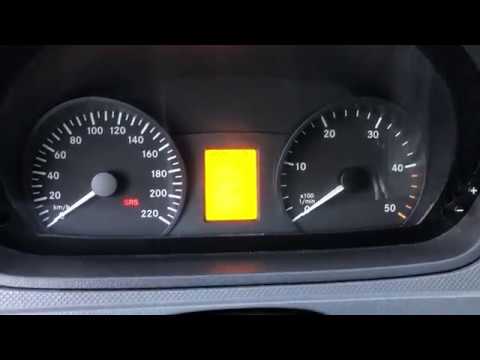
In this tutorial, you can see how to set the time on a Mercedes Vito van, an extremely simple and quick operation, for example, after replacing the battery or after switching to daylight saving time. First, insert the key and turn on the instrument cluster, then repeatedly press the "M" button located to the left of the dashboard until you reach the screen displaying the time in flashing mode. At this point, adjust the hour using the "+" and "-" buttons located on the opposite side, switch to minutes using the "O" button, and finally save the setting.

Watch the video!


by ScegliAuto

More videos
