
|
Do it yourself
| |||
| ||||


Remote Key Battery Replacement
Model: Nissan Murano
Z52, MK 3
- Years 2014-2024
Replacing the remote key battery is straightforward, but handle the plastic covers carefully to avoid damaging them during disassembly. Start by extracting the metal key from the back of the remote by pressing the side lock. At the back, you will find two slots where you can insert the tip of a small screwdriver (ideally protected with insulating tape or masking tape) to lever open the two halves and access the battery compartment. Once the halves are open, replace the battery and refit the covers.
Updated on 17 February 2026 by ScegliAuto
Video tutorial
Related tutorials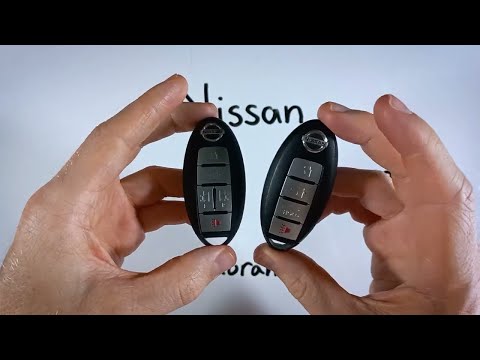
Nissan Murano
(2014-2024 /
Z52, MK 3)
If you want to independently replace the battery of your Nissan Murano key, simply follow the steps outlined in this mini guide. First, locate the sm…

Nissan Murano
(2008-2014 /
Z51, MK 2)
In the following guide aimed at all of you who own a second series Nissan Murano (year 2011), you will find the description of all the necessary step…

Nissan Murano
(2014-2024 /
Z52, MK 3)
To correctly complete the replacement of the small battery inside the key of your Nissan Murano, you must follow all the steps described in our new m…
Other guides you may be interested in
|
How to Check the Oil Level on a Jeep Renegade?
To check the oil level on a Jeep Renegade, you need to open the bonnet to access the components inside the engine bay: on the lower left side of the engine block, you will find the dipstick for checking the level. This should be pulled out and thoroughly cleaned with a cloth: once cleaned, reinsert it back into its tube and pull it out immediately after. This way, you can check that the oil mark is between the minimum and maximum levels; finally, you can place the dipstick back in its tube. by ScegliAuto More videos
|
|
For advertising on this site Write to info@scegliauto.com
ScegliAuto is not responsible for any inaccuracy of the data in the lists. To report any inaccuracy or your business (if you own the business in question), please write to info@scegliauto.com
Number of seconds to generate the page: 0.838
(c) ScegliAuto 2026 - info@scegliauto.com - Privacy policy VAT number: IT01247470535 |
