
|
Do it yourself
| |||
| ||||


Reset the regular maintenance service reminder of the Volkswagen Tiguan.
Model: Volkswagen Tiguan
BW, MK 2, AD
- Years 2016-2025
Let's see the instructions on how to reset the maintenance service light of the engine oil change for the Volkswagen Tiguan. First, we get into the car and start pressing and holding the reset button found on the instrument panel; then we turn on the ignition by pressing the ignition button once, waiting for the maintenance key reset question to appear on the instrument panel display. At this point, we release the button and press it again once to completely reset the service light.
Posted on 10 June 2025 by ScegliAuto
Video tutorial
Related tutorials
Volkswagen Tiguan
(2024-2026 /
MK 3)
After performing the maintenance service, it is necessary to reset the service light; let's see how to do it on the Volkswagen Tiguan. First of all, …

Volkswagen Tiguan
(2016-2025 /
BW, MK 2, AD)
In a few simple steps, we will see the process of resetting the maintenance reminder for the oil change (service) of the Volkswagen Tiguan. First, we…

Volkswagen Tiguan
(2016-2025 /
BW, MK 2, AD)
Today's instructions will allow us to reset the regular maintenance reminder for the oil change (service) of the Volkswagen Tiguan. First, we get int…
Other guides you may be interested in
|
How to Recline the Rear Seats in a Renault Kwid?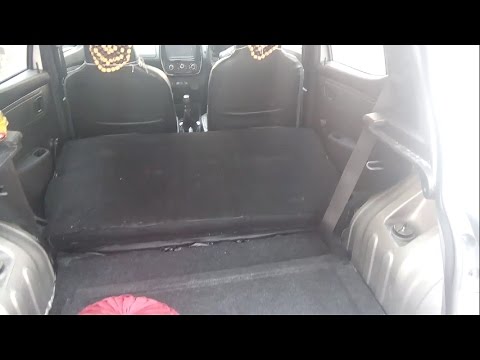
In this tutorial, see how to fully recline the rear seats in a Renault Kwid, a very simple and quick operation to increase space in the trunk. To do this, first enter the vehicle and open the hatch. Then, remove the upper panel and locate the two metal hooks on both sides of the seatback. Next, unlock both by pulling towards you and push the seat forward, lowering it completely. To return the seatback to position, simply pull it towards you and secure it to the two hooks. by ScegliAuto More videos
|

|
For advertising on this site Write to info@scegliauto.com
ScegliAuto is not responsible for any inaccuracy of the data in the lists. To report any inaccuracy or your business (if you own the business in question), please write to info@scegliauto.com
Number of seconds to generate the page: 0.205
(c) ScegliAuto 2026 - info@scegliauto.com - Privacy policy VAT number: IT01247470535 |
