
|
Do it yourself
| |||
| ||||


How to Replace the Auxiliary Battery in a Volvo XC60?
Model: Volvo Xc60
- Years 2017-2026
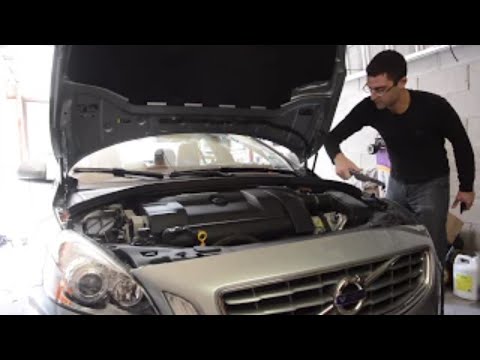
To replace the auxiliary battery in a Volvo XC60, open the hood to access the components inside the engine compartment. Here, you will find the battery in its housing on the right side near the corresponding shock absorber. Loosen the screws that secure the device to its seat and disconnect the corresponding connectors. The old battery can then be removed to install the new one. Secure and connect the new battery to ensure everything functions properly.
Posted on 4 October 2026 by ScegliAuto
Video tutorial
Related tutorials
Volvo Xc60
(2017-2026 /
MK 2)
To replace the auxiliary battery of a Volvo XC60, start by accessing the rear luggage compartment, where it is housed. Lift the trunk floor to reach …

Volvo Xc60
(2017-2026 /
MK 2)
These brief and simple steps will show us how to disassemble and replace the battery of the Volvo XC60. First, let's open the rear hatch of the trunk…
Volvo Xc60
(2008-2016 /
MK 1)
With the following guide, you will finally be able to replace the battery in your Volvo XC60 independently and safely. First, turn off the car and ma…
Other guides you may be interested in
|
Resetting the Tyre Pressure Warning Light on the Hyundai I20
The following instructions will show you how to reset the tyre pressure warning light on the Hyundai I20; before performing the reset, ensure that all four tyres are at the correct operating pressure. Then, get in the vehicle and turn on the ignition; press and hold the TPMS button located on the controls to the left of the steering wheel, as well as on the dashboard, as shown in the video. If the tyre pressures are correct, the warning light will automatically reset on the instrument panel; finally, turn off the ignition and start the engine! by ScegliAuto More videos
|
|
For advertising on this site Write to info@scegliauto.com
ScegliAuto is not responsible for any inaccuracy of the data in the lists. To report any inaccuracy or your business (if you own the business in question), please write to info@scegliauto.com
Number of seconds to generate the page: 0.555
(c) ScegliAuto 2026 - info@scegliauto.com - Privacy policy VAT number: IT01247470535 |
