
|
Do it yourself
| |||
| ||||


How to reset the TPMS light on the Ford Transit?
Model: Ford Transit
- Years:
2014, 2015, 2016, 2017, 2018, 2019, 2020, 2021, 2022, 2023, 2024
Video tutorial
To reset the TPMS light on the Ford Transit, get into the vehicle and turn on the instrument cluster without starting the engine. First, ensure that all tyres are inflated to the correct pressure indicated by the manufacturer. Use the buttons on the steering wheel to enter the onboard computer menu and scroll to the section dedicated to tyre pressure. Select the reset or store pressure option and confirm your choice. The system will start the sensor learning procedure. After confirmation, exit the menu and drive the vehicle for a few minutes so the system registers the new values and the TPMS light disappears from the instrument cluster.
Posted on 10 October 2026 by ScegliAuto
Related tutorials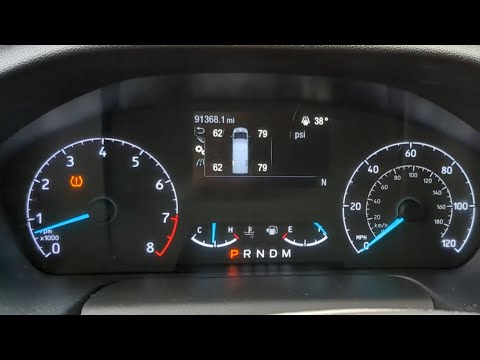
Ford Transit
(2014-2024 /
MK 8)
After adjusting the tyre pressures, you need to reset the corresponding light, known as the TPMS light. The TPMS light on the 2020 Ford Transit is re…

Ford Transit
(2014-2024 /
MK 8)
The TPMS warning light reset on a 2015 Ford Transit vehicle should only be performed after adjusting the tire pressure. Once the correct pressure is …

Ford Transit
(2014-2024 /
MK 8)
The TPMS light on a Ford Transit vehicle is used to indicate the tire pressure. When this light comes on in orange, it means we need to check the pre…
Other guides you may be interested in
|
How to reset the Service light of the Fiat 500X?
To reset the Service light of the Fiat 500X, insert the ignition key into the ignition switch to turn on the instrument cluster. Once powered on, press the accelerator pedal three times in quick succession. After this operation, wait a few seconds for the Service light reset to complete. Once the reset procedure is finished, release the pedals and then turn off the instrument cluster by turning the key. by ScegliAuto More videos
|
|
For advertising on this site Write to info@scegliauto.com
ScegliAuto is not responsible for any inaccuracy of the data in the lists. To report any inaccuracy or your business (if you own the business in question), please write to info@scegliauto.com
Number of seconds to generate the page: 0.100
(c) ScegliAuto 2026 - info@scegliauto.com - Privacy policy VAT number: IT01247470535 |
