
|
Do it yourself
| |||
| ||||


Dacia Sandero - Onboard computerOnboard Computer Dacia Sandero (2021-2028 / mk 3) Dacia Sandero (2021-2026 / MK 3)
How to use the emergency braking system on the Dacia Sandero Stepway The Dacia Sandero Stepway's active emergency braking system uses a front camera to detect the distance from vehicles ahead or approaching from an intersection. …Read all… Posted on 27 June 2026 by ScegliAuto  Dacia Sandero (2021-2026 / MK 3)
Using the Start & Stop System on the Dacia Sandero On the Dacia Sandero, as with many other vehicles, the purpose of the start & stop system is to reduce fuel consumption and emissions by automatically turning …Read all… Posted on 5 June 2026 by ScegliAuto  Dacia Sandero (2021-2026 / MK 3)
How to Reset the Average Fuel Consumption on a Dacia Sandero 3 Today, we will show you how to reset the average fuel consumption on a Dacia Sandero produced from 2021 onwards. To perform this simple operation, press the …Read all… Posted on 28 February 2026 by ScegliAuto  Dacia Sandero (2021-2026 / MK 3)
How to Disable the ESP on a Dacia Sandero Stepway In this video, you will see how to disable the ESP/TSC on a Dacia Sandero by safely installing a switch with a relay. A simple switch is not sufficient, as the …Read all… Posted on 27 February 2026 by ScegliAuto  Dacia Sandero (2021-2026 / MK 3)
How to Reset the Trip Information on the Dacia Sandero 3 The following video tutorial shows how to reset the trip information on a Dacia Sandero 3 vehicle produced from 2021 to the present independently and without …Read all… Posted on 23 February 2026 by ScegliAuto  Dacia Sandero (2021-2026 / MK 3)
How to Use the SOS Button on the 2023 Dacia Sandero The Dacia Sandero is equipped with a "Free Emergency Call Service" that automatically contacts emergency services in case of an accident or illness. The green …Read all… Posted on 31 January 2026 by ScegliAuto  Dacia Sandero (2012-2020 / B8)
How to modify the onboard computer interface of the Dacia Stepway. Today we will explain how to modify the onboard computer interface of the Dacia Sandero. To perform this operation, we need to access the Dacia website to …Read all… Posted on 3 January 2026 by ScegliAuto  Dacia Sandero (2021-2026 / MK 3)
The lane assist cannot be permanently deactivated on the Dacia Sandero (nor on other vehicles). Based on EU regulation 2019/2144, starting from July 2022, all vehicles approved in the EU must be equipped with lane assist, which is active by default and …Read all… Posted on 29 November 2025 by ScegliAuto  Dacia Sandero (2012-2020 / B8)
How to adjust the speed limit on the Dacia Sandero. The preset speed limit allows you to maintain the vehicle at a chosen speed without having to press the pedals. To adjust the speed limit, we need to press the …Read all… Posted on 25 November 2025 by ScegliAuto  Dacia Sandero (2021-2026 / MK 3)
How to set the time on the display of a Dacia Sandero In this video we can see how to set the time on the multimedia screen of a Dacia Sandero: from the buttons on the left side of the screen, we press the power …Read all… Posted on 6 October 2025 by ScegliAuto  Dacia Sandero (2021-2026 / MK 3)
How to use the START&STOP system of the 2023 Dacia Sandero The START&STOP function on Dacia Sandero vehicles allows to reduce fuel consumption and gas emissions by putting the engine on standby when the vehicle is …Read all… Posted on 1 July 2025 by ScegliAuto  Dacia Sandero (2012-2020 / B8)
How to change the background image on the screen of a Dacia Sandero Stepway In this video, we will see how to change the background image on the screen of the Dacia Sandero Stepway. We will need a USB stick formatted in FAT32, on which …Read all… Posted on 21 May 2025 by ScegliAuto  Dacia Sandero (2012-2020 / B8)
How to deactivate the navigation system of the Dacia Sandero If after setting the route on our navigator we decide to change the route or delete the route, it is not necessary to turn off the radio or turn off the …Read all… Posted on 12 February 2025 by ScegliAuto  Dacia Sandero (2021-2026 / MK 3)
How to use the blind spot warning function on the Sandero Stepway In this video we can see how to use the blind spot warning function on the Dacia Sandero Stepway. This function is activated using sensors located on the front …Read all… Posted on 24 August 2024 by ScegliAuto 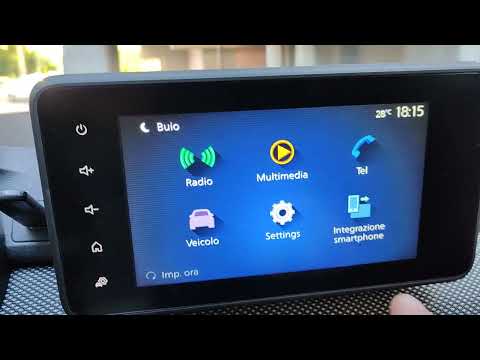 Dacia Sandero (2021-2026 / MK 3)
How to change the backgrounds on the Dacia display In this video, we will see how to change the backgrounds on a Dacia Sandero Stepway with Software version 6.0.9.4. This is essential as each version has its …Read all… Posted on 12 August 2026 by ScegliAuto 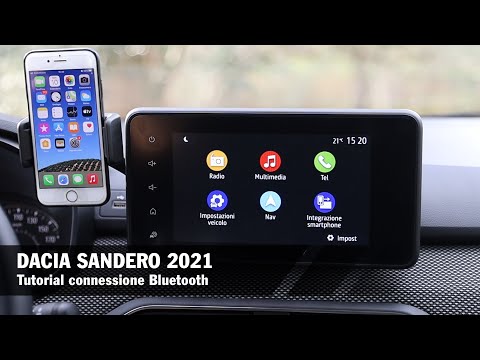 Dacia Sandero (2021-2026 / MK 3)
How to Connect Your Smartphone to the Dacia Sandero Connecting your smartphone to the Dacia Sandero is really simple and takes just a few seconds. Start the car and click on the "smartphone integration" icon …Read all… Posted on 23 June 2026 by ScegliAuto 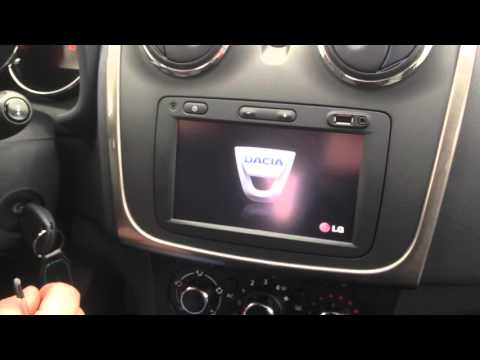 Dacia Sandero (2008-2012 / BS)
How to Access the Secret Menu of the On-Board Computer in a Dacia Sandero To access the secret menu of the on-board computer in a Dacia Sandero, first, start the navigator and turn on the engine by turning the ignition key. Wait …Read all… Posted on 28 March 2026 by ScegliAuto Onboard Computer Dacia Sandero (2012-2020 / b 8)
Dacia Sandero (2021-2026 / MK 3)How to use the emergency braking system on the Dacia Sandero Stepway The Dacia Sandero Stepway's active emergency braking system uses a front camera to detect the distance from vehicles ahead or approaching from an intersection. …Read all… Posted on 27 June 2026 by ScegliAuto
Dacia Sandero (2021-2026 / MK 3)Using the Start & Stop System on the Dacia Sandero On the Dacia Sandero, as with many other vehicles, the purpose of the start & stop system is to reduce fuel consumption and emissions by automatically turning …Read all… Posted on 5 June 2026 by ScegliAuto
Dacia Sandero (2021-2026 / MK 3)How to Reset the Average Fuel Consumption on a Dacia Sandero 3 Today, we will show you how to reset the average fuel consumption on a Dacia Sandero produced from 2021 onwards. To perform this simple operation, press the …Read all… Posted on 28 February 2026 by ScegliAuto
Dacia Sandero (2021-2026 / MK 3)How to Disable the ESP on a Dacia Sandero Stepway In this video, you will see how to disable the ESP/TSC on a Dacia Sandero by safely installing a switch with a relay. A simple switch is not sufficient, as the …Read all… Posted on 27 February 2026 by ScegliAuto
Dacia Sandero (2021-2026 / MK 3)How to Reset the Trip Information on the Dacia Sandero 3 The following video tutorial shows how to reset the trip information on a Dacia Sandero 3 vehicle produced from 2021 to the present independently and without …Read all… Posted on 23 February 2026 by ScegliAuto
Dacia Sandero (2021-2026 / MK 3)How to Use the SOS Button on the 2023 Dacia Sandero The Dacia Sandero is equipped with a "Free Emergency Call Service" that automatically contacts emergency services in case of an accident or illness. The green …Read all… Posted on 31 January 2026 by ScegliAuto
Dacia Sandero (2012-2020 / B8)How to modify the onboard computer interface of the Dacia Stepway. Today we will explain how to modify the onboard computer interface of the Dacia Sandero. To perform this operation, we need to access the Dacia website to …Read all… Posted on 3 January 2026 by ScegliAuto
Dacia Sandero (2021-2026 / MK 3)The lane assist cannot be permanently deactivated on the Dacia Sandero (nor on other vehicles). Based on EU regulation 2019/2144, starting from July 2022, all vehicles approved in the EU must be equipped with lane assist, which is active by default and …Read all… Posted on 29 November 2025 by ScegliAuto
Dacia Sandero (2012-2020 / B8)How to adjust the speed limit on the Dacia Sandero. The preset speed limit allows you to maintain the vehicle at a chosen speed without having to press the pedals. To adjust the speed limit, we need to press the …Read all… Posted on 25 November 2025 by ScegliAuto
Dacia Sandero (2021-2026 / MK 3)How to set the time on the display of a Dacia Sandero In this video we can see how to set the time on the multimedia screen of a Dacia Sandero: from the buttons on the left side of the screen, we press the power …Read all… Posted on 6 October 2025 by ScegliAuto
Dacia Sandero (2021-2026 / MK 3)How to use the START&STOP system of the 2023 Dacia Sandero The START&STOP function on Dacia Sandero vehicles allows to reduce fuel consumption and gas emissions by putting the engine on standby when the vehicle is …Read all… Posted on 1 July 2025 by ScegliAuto
Dacia Sandero (2012-2020 / B8)How to change the background image on the screen of a Dacia Sandero Stepway In this video, we will see how to change the background image on the screen of the Dacia Sandero Stepway. We will need a USB stick formatted in FAT32, on which …Read all… Posted on 21 May 2025 by ScegliAuto
Dacia Sandero (2012-2020 / B8)How to deactivate the navigation system of the Dacia Sandero If after setting the route on our navigator we decide to change the route or delete the route, it is not necessary to turn off the radio or turn off the …Read all… Posted on 12 February 2025 by ScegliAuto
Dacia Sandero (2021-2026 / MK 3)How to use the blind spot warning function on the Sandero Stepway In this video we can see how to use the blind spot warning function on the Dacia Sandero Stepway. This function is activated using sensors located on the front …Read all… Posted on 24 August 2024 by ScegliAuto
Dacia Sandero (2021-2026 / MK 3)How to change the backgrounds on the Dacia display In this video, we will see how to change the backgrounds on a Dacia Sandero Stepway with Software version 6.0.9.4. This is essential as each version has its …Read all… Posted on 12 August 2026 by ScegliAuto
Dacia Sandero (2021-2026 / MK 3)How to Connect Your Smartphone to the Dacia Sandero Connecting your smartphone to the Dacia Sandero is really simple and takes just a few seconds. Start the car and click on the "smartphone integration" icon …Read all… Posted on 23 June 2026 by ScegliAuto
Dacia Sandero (2008-2012 / BS)How to Access the Secret Menu of the On-Board Computer in a Dacia Sandero To access the secret menu of the on-board computer in a Dacia Sandero, first, start the navigator and turn on the engine by turning the ignition key. Wait …Read all… Posted on 28 March 2026 by ScegliAuto Onboard Computer Dacia Sandero (2008-2012 / bs)
Dacia Sandero (2021-2026 / MK 3)How to use the emergency braking system on the Dacia Sandero Stepway The Dacia Sandero Stepway's active emergency braking system uses a front camera to detect the distance from vehicles ahead or approaching from an intersection. …Read all… Posted on 27 June 2026 by ScegliAuto
Dacia Sandero (2021-2026 / MK 3)Using the Start & Stop System on the Dacia Sandero On the Dacia Sandero, as with many other vehicles, the purpose of the start & stop system is to reduce fuel consumption and emissions by automatically turning …Read all… Posted on 5 June 2026 by ScegliAuto
Dacia Sandero (2021-2026 / MK 3)How to Reset the Average Fuel Consumption on a Dacia Sandero 3 Today, we will show you how to reset the average fuel consumption on a Dacia Sandero produced from 2021 onwards. To perform this simple operation, press the …Read all… Posted on 28 February 2026 by ScegliAuto
Dacia Sandero (2021-2026 / MK 3)How to Disable the ESP on a Dacia Sandero Stepway In this video, you will see how to disable the ESP/TSC on a Dacia Sandero by safely installing a switch with a relay. A simple switch is not sufficient, as the …Read all… Posted on 27 February 2026 by ScegliAuto
Dacia Sandero (2021-2026 / MK 3)How to Reset the Trip Information on the Dacia Sandero 3 The following video tutorial shows how to reset the trip information on a Dacia Sandero 3 vehicle produced from 2021 to the present independently and without …Read all… Posted on 23 February 2026 by ScegliAuto
Dacia Sandero (2021-2026 / MK 3)How to Use the SOS Button on the 2023 Dacia Sandero The Dacia Sandero is equipped with a "Free Emergency Call Service" that automatically contacts emergency services in case of an accident or illness. The green …Read all… Posted on 31 January 2026 by ScegliAuto
Dacia Sandero (2012-2020 / B8)How to modify the onboard computer interface of the Dacia Stepway. Today we will explain how to modify the onboard computer interface of the Dacia Sandero. To perform this operation, we need to access the Dacia website to …Read all… Posted on 3 January 2026 by ScegliAuto
Dacia Sandero (2021-2026 / MK 3)The lane assist cannot be permanently deactivated on the Dacia Sandero (nor on other vehicles). Based on EU regulation 2019/2144, starting from July 2022, all vehicles approved in the EU must be equipped with lane assist, which is active by default and …Read all… Posted on 29 November 2025 by ScegliAuto
Dacia Sandero (2012-2020 / B8)How to adjust the speed limit on the Dacia Sandero. The preset speed limit allows you to maintain the vehicle at a chosen speed without having to press the pedals. To adjust the speed limit, we need to press the …Read all… Posted on 25 November 2025 by ScegliAuto
Dacia Sandero (2021-2026 / MK 3)How to set the time on the display of a Dacia Sandero In this video we can see how to set the time on the multimedia screen of a Dacia Sandero: from the buttons on the left side of the screen, we press the power …Read all… Posted on 6 October 2025 by ScegliAuto
Dacia Sandero (2021-2026 / MK 3)How to use the START&STOP system of the 2023 Dacia Sandero The START&STOP function on Dacia Sandero vehicles allows to reduce fuel consumption and gas emissions by putting the engine on standby when the vehicle is …Read all… Posted on 1 July 2025 by ScegliAuto
Dacia Sandero (2012-2020 / B8)How to change the background image on the screen of a Dacia Sandero Stepway In this video, we will see how to change the background image on the screen of the Dacia Sandero Stepway. We will need a USB stick formatted in FAT32, on which …Read all… Posted on 21 May 2025 by ScegliAuto
Dacia Sandero (2012-2020 / B8)How to deactivate the navigation system of the Dacia Sandero If after setting the route on our navigator we decide to change the route or delete the route, it is not necessary to turn off the radio or turn off the …Read all… Posted on 12 February 2025 by ScegliAuto
Dacia Sandero (2021-2026 / MK 3)How to use the blind spot warning function on the Sandero Stepway In this video we can see how to use the blind spot warning function on the Dacia Sandero Stepway. This function is activated using sensors located on the front …Read all… Posted on 24 August 2024 by ScegliAuto
Dacia Sandero (2021-2026 / MK 3)How to change the backgrounds on the Dacia display In this video, we will see how to change the backgrounds on a Dacia Sandero Stepway with Software version 6.0.9.4. This is essential as each version has its …Read all… Posted on 12 August 2026 by ScegliAuto
Dacia Sandero (2021-2026 / MK 3)How to Connect Your Smartphone to the Dacia Sandero Connecting your smartphone to the Dacia Sandero is really simple and takes just a few seconds. Start the car and click on the "smartphone integration" icon …Read all… Posted on 23 June 2026 by ScegliAuto
Dacia Sandero (2008-2012 / BS)How to Access the Secret Menu of the On-Board Computer in a Dacia Sandero To access the secret menu of the on-board computer in a Dacia Sandero, first, start the navigator and turn on the engine by turning the ignition key. Wait …Read all… Posted on 28 March 2026 by ScegliAuto Accelerator (1) Airbag (4) Speaker (3) Shocks (1) Antenna (2) Air conditioning (1) Car stereo (24) Roof rack bars (7) Battery (11) Ignition coil (1) Air vents (1) Transmission (3) Spark plugs (4) Glow plugs (1) Body (9) Control unit (1) Key (17) Trunk lock (1) Timing belt (10) V-belt (1) Onboard computer (17) Checks and maintenance (55) Dashboard (3) Brake rotors (1) Side marker light (1) Headlight (8) Tail light (4) Air filter (20) Cabin air filter (28) Diesel fuel filter (6) Oil filter (5) Parking brake (4) Fuel injectors (1) Accessory kit (4) Light bulb (12) Side marker bulb (1) Headlight bulb (28) Tail light bulb (11) Interior dome light bulb (2) Instrument panel light (1) License plate light (3) (5) Rear window (1) Handle (1) Engine (1) Transmission fluid (2) Engine oil (6) Clock (16) Door trim panel (13) Front bumper (5) Rear bumper (2) Brake pads (9) Tires (3) Shift knob (9) Pump (1) Car door (1) Instrument cluster (6) Wheel (2) Fuse box (41) Seat (3) Door lock (3) Side mirror (6) Warning light – error code (34) (58) Tire pressure warning light (24) Service warning light (101) Windshield wipers (17) Center console tunnel (1) EGR valve (1) Blower motor (2) Steering wheel (3) |
Where is the Spare Wheel in the Peugeot 5008?
This video shows where the spare wheel is located in the Peugeot 5008 and how to access it, useful in case of a puncture. As shown, the wheel is not in the usual boot compartment but underneath it, outside the vehicle. To free the wheel, first gather the tools provided, then open the boot, locate the small indicated hatch, and open it. Next, loosen the bolt just released using the large socket wrench enough to lower the wheel to the ground. by ScegliAuto More videos
|
|
For advertising on this site Write to info@scegliauto.com
ScegliAuto is not responsible for any inaccuracy of the data in the lists. To report any inaccuracy or your business (if you own the business in question), please write to info@scegliauto.com
Number of seconds to generate the page: 0.025
(c) ScegliAuto 2026 - info@scegliauto.com - Privacy policy VAT number: IT01247470535 |
