
|
Do it yourself
| |||
| ||||


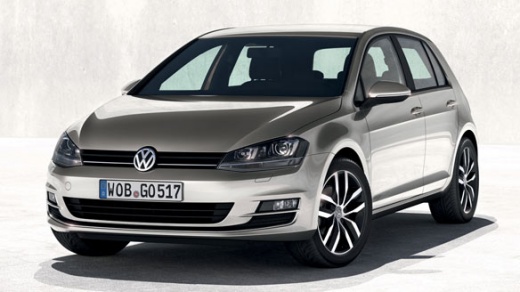
How to replace the oil filter and engine oil of the Volkswagen Golf 7
Model: Volkswagen Golf
MK 7, Golf 7, Golf VII
- Years:
2012, 2013, 2014, 2015, 2016, 2017, 2018, 2019
Video tutorial
Today we will see together how to replace the engine oil and oil filter of the Volkswagen Golf model mk7. Before starting the engine oil replacement, it is important to pour the pre-change liquid into the oil tank to clean it. We open the front hood and pour the pre-change liquid into the engine oil tank; we let the product work for 20 minutes, 10 of which with the engine running. We lift the vehicle off the ground and remove the 19mm nut from the oil pan to let the oil and residues drain into a container. Using a 32mm socket wrench, we unscrew the nut blocking the oil filter box; we remove the box from its seat and replace the filter inside. We mount the box in its housing and tighten the nut on the oil pan to bring the vehicle back to the ground. Finally, we pour the new engine oil into the oil tank.
Posted on 10 September 2025 by ScegliAuto
Related tutorials
Volkswagen Golf
(1997-2003 /
Golf IV, Golf 4, MK 4)
In this video tutorial, you will learn how to replace the engine oil and oil filter of a Volkswagen Golf 4. First, lift the car and remove the Torx s…

Volkswagen Golf
(2012-2019 /
MK 7, Golf 7, Golf VII)
Today's information will show us how to perform the routine maintenance service, replacing the engine oil and oil filter, on a Volkswagen Golf 2.0 TD…
Volkswagen Golf
(2003-2008 /
Golf 5, MK 5, Golf V)
Today, I will show you how to change the engine oil and filter on your Volkswagen Golf. It is not a very complex operation; just be careful. First, r…
Other guides you may be interested in
|
How to Reset the Tire Pressure Light on a MG ZS?
On the instrument cluster of the MG ZS, the tire pressure light that appears can be reset by inflating the tires to the correct pressure: this value will be indicated on the sticker attached to the driver's door pillar. Once the tires have been properly inflated, you can turn on the instrument cluster and navigate through the menu until you find the option that indicates tire pressure: if this screen shows the new values, the light will turn off; otherwise, you will need to drive for a few miles so that the sensors can read the new values and turn off the light afterward. by ScegliAuto More videos
|
|
For advertising on this site Write to info@scegliauto.com
ScegliAuto is not responsible for any inaccuracy of the data in the lists. To report any inaccuracy or your business (if you own the business in question), please write to info@scegliauto.com
Number of seconds to generate the page: 0.187
(c) ScegliAuto 2026 - info@scegliauto.com - Privacy policy VAT number: IT01247470535 |
