
|
Do it yourself
| |||
| ||||


Honda CR-V - Video guides
 Honda CR-V (2012-2017 / MK 4)
Location and Diagram of the Fuse Boxes for the 2016 Honda CR-V You will find the fuse box for the dashboard inside the cabin of the Honda CR-V, on the lower left side of the steering wheel, in a drawer located under the …Read all… Posted on 21 September 2026 by ScegliAuto  Honda CR-V (1995-2001 / MK 1)
How to Reset the Airbag Light on a 1999 Honda CR-V Today, learn how to reset the airbag light on a 1999 Honda CR-V. Get into the vehicle and, while keeping the ignition off, remove the glove compartment on the …Read all… Posted on 8 September 2026 by ScegliAuto  Honda CR-V (2017-2022 / MK 5)
How to Reset the Service Light in a Honda CR-V? In this tutorial, you will learn how to reset the service light in a Honda CR-V, an extremely simple and quick operation to perform only after completing all …Read all… Posted on 9 September 2026 by ScegliAuto  Honda CR-V (2012-2017 / MK 4)
How to Reset the Service Light on the 2017 Honda CR-V This article shows how to reset the service light on the 2017 Honda CR-V. To reset the light, start the instrument panel, after starting the panel, press the …Read all… Posted on 6 September 2026 by ScegliAuto  Honda CR-V (2017-2022 / MK 5)
How to Reset the Service Light on a Honda CR-V 2020 Resetting the maintenance indicator on a Honda CR-V 2020 is done through the dashboard menu. Turn on the ignition (without starting the engine). Use the …Read all… Posted on 1 September 2026 by ScegliAuto  Honda CR-V (2007-2012 / MK 3)
How to open the boot lid from the inside on the Honda CR-V? It's very easy; if you find yourself suddenly unable to open the rear boot handle from the outside, you can manage everything from the inside, and here’s …Read all… Posted on 30 August 2026 by ScegliAuto  Honda CR-V (2012-2017 / MK 4)
How to Reset the TPMS Light on the Honda CR-V Today, we will explain how to independently reset the tyre pressure monitoring system (TPMS) light on a Honda CR-V. To reset the light, turn on the ignition …Read all… Posted on 30 August 2026 by ScegliAuto  Honda CR-V (2017-2022 / MK 5)
Resetting the Tyre Pressure Monitoring System (TPMS) Light on a Honda CR-V Today, we will look at how to reset the tyre pressure monitoring system (TPMS) light on a Honda CR-V. Before recalibrating the TPMS sensors, ensure all four …Read all… Posted on 29 August 2026 by ScegliAuto  Honda CR-V (2017-2022 / MK 5)
How to Reset the TPMS Light on a Honda CR-V To reset the TPMS light on a Honda CR-V, use the central touchscreen. Turn on the instrument panel, then tap the "Settings" icon on the display to access the …Read all… Posted on 29 August 2026 by ScegliAuto  Honda CR-V (2012-2017 / MK 4)
How to replace the fog light bulb on the 2015 Honda CR-V Today, I will explain how to replace the fog light bulb on the 2015 Honda CR-V. To replace the bulb, you must remove the plastic cover on the bodywork and then …Read all… Posted on 26 August 2026 by ScegliAuto  Honda CR-V (2007-2012 / MK 3)
How to Reset the Service Light on a 2009 Honda CR-V To reset the service light on a 2009 Honda CR-V, turn on the instrument panel and press the TRIP A button for a few seconds. Release the button and wait for …Read all… Posted on 17 August 2026 by ScegliAuto  Honda CR-V (2017-2022 / MK 5)
How to reset the tyre pressure warning light on the Honda CR-V? To completely clear the tyre pressure warning light that appears on the instrument panel of the Honda CR-V, you need to bring all tyres to the optimal …Read all… Posted on 14 August 2026 by ScegliAuto  Honda CR-V (2012-2017 / MK 4)
How to Reset the Tyre Light on a Honda CR-V 4 If you own a fourth-generation Honda CR-V and want to manually reset the tyre light, then the following guide is all you need. First, ensure that all the …Read all… Posted on 13 August 2026 by ScegliAuto  Honda CR-V (2007-2012 / MK 3)
How to Replace the Rear Brake Light on the Honda CR-V? Today, we will go through the instructions to remove the rear lamp and replace the brake light bulbs on the Honda CR-V. First, open the boot and start removing …Read all… Posted on 5 August 2026 by ScegliAuto  Honda CR-V (2023-2026 / MK 6, RS)
How to Reset the Service Light on the 2025 Honda CR-V Today, you will learn how to reset the service light on a 2025 Honda CR-V. Press the ignition button twice in quick succession, then press the menu button …Read all… Posted on 5 August 2026 by ScegliAuto  Honda CR-V (2012-2017 / MK 4)
How to Reset the Tyre Pressure Warning on the Honda CR-V These brief and simple steps will allow you to reset the tyre pressure warning on the Honda CR-V. Before recalibrating the TPMS sensors, ensure all four tyres …Read all… Posted on 24 July 2026 by ScegliAuto  Honda CR-V (2017-2022 / MK 5)
How to Replace or Repair the Sun Visor on a Honda CR-V Today, we will discover the instructions that will allow us to remove and replace the sun visor on a Honda CR-V. First, get inside the cabin and start prying …Read all… Posted on 20 July 2026 by ScegliAuto  Honda CR-V (2002-2007 / MK 2)
How to Remove the Front Seat on the Honda CR-V In this guide, you will find the instructions to remove and detach the front seat on the Honda CR-V. First, open the front door and start unscrewing all the …Read all… Posted on 17 July 2026 by ScegliAuto  Honda CR-V (2023-2026 / MK 6, RS)
How to Reset the Tyre Pressure Warning on a Honda CR-V MK6 To reset the tyre pressure warning on a Honda CR-V MK6, first ensure that all tyres are inflated to the correct pressure: 35 PSI front (2.41 bar) and 32 PSI …Read all… Posted on 18 July 2026 by ScegliAuto  Honda CR-V (2012-2017 / MK 4)
How to Reset the TPMS Light on Honda Vehicles from 2012 Onwards Let's see how to reset the TPMS on Honda vehicles. The one in the video is a CR-V, but the procedure is the same across all models from 2012 onwards. First, …Read all… Posted on 14 July 2026 by ScegliAuto
Airbag (2)
Shocks (6)
Antenna (1)
Car stereo (12)
Anti-roll bar (2)
Roof rack bars (3)
Battery (8)
Ignition coil (1)
Control arm (6)
Spark plugs (6)
Body (14)
Control unit (1)
Wheel rim (1)
Key (27)
Trunk lock (1)
Timing belt (4)
Air conditioner (1)
Onboard computer (3)
Checks and maintenance (14)
Dashboard (5)
Shifter boot (1)
Bearing (2)
MAF sensor (3)
Differential (2)
Brake rotors (4)
Headlight (8)
Tail light (5)
Fog lights (6)
Air filter (15)
Cabin air filter (14)
Fuel filter (2)
Diesel fuel filter (5)
Oil filter (4)
Grille (2)
Accessory kit (17)
Light bulb (9)
Headlight bulb (13)
Tail light bulb (4)
Interior dome light bulb (5)
Antifreeze coolant (3)
Instrument panel light (2)
License plate light (6)
(2)
Handle (2)
Exhaust muffler (1)
Engine (1)
Power window motor (1)
Starter motor (2)
Transmission fluid (2)
Engine oil (10)
Clock (14)
Door trim panel (10)
Windshield (1)
Front bumper (3)
Rear bumper (2)
Brake pads (3)
Hydraulic pistons (1)
Shift knob (2)
Pump (4)
Fuel pump (2)
Car door (1)
Push button (2)
Power window switch (1)
Instrument cluster (3)
Radiator (3)
Heater core (1)
Fuse box (27)
Seat (2)
Crankshaft position sensor (3)
Parking sensors (2)
Door lock (1)
Suspension system (1)
Side mirror (7)
Rearview mirror (3)
AdBlue warning light (1)
Warning light – error code (33)
(119)
Tire pressure warning light (18)
Service warning light (81)
Manufacturer emblem (1)
Windshield wipers (13)
Cylinder head (3)
Drivetrain (1)
Center console tunnel (1)
Valve (2)
EGR valve (2)
Blower motor (1)
Side window (1)
Steering wheel (6)
|
See also:
Resetting the Tyre Pressure Warning Light on the Hyundai I20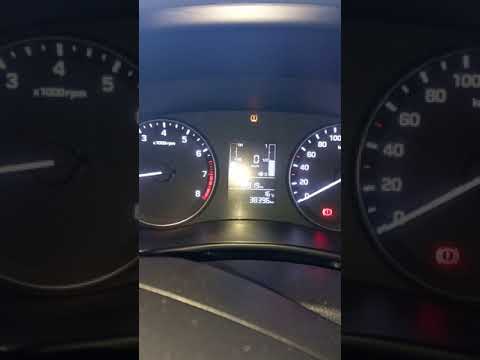
Today, let's look at the instructions to reset the tyre pressure warning light on the Hyundai I20 in simple and quick steps. The vehicle is equipped with an automatic TPMS that constantly monitors tyre pressures; when an anomaly occurs, the system triggers an alarm, displaying the relevant warning light on the dashboard. So, restore the tyre pressures, which will automatically reset the TPMS light on the dashboard; finally, turn off the ignition and start the engine! by ScegliAuto More videos
|
|
For advertising on this site Write to info@scegliauto.com
ScegliAuto is not responsible for any inaccuracy of the data in the lists. To report any inaccuracy or your business (if you own the business in question), please write to info@scegliauto.com
Number of seconds to generate the page: 0.579
(c) ScegliAuto 2026 - info@scegliauto.com - Privacy policy VAT number: IT01247470535 |
