
|
Do it yourself
| |||
| ||||


Peugeot 206 - Onboard computerOnboard Computer Peugeot 206 (1998-2012 / mk 1) Peugeot 206 (1998-2012 / MK 1)
Two Ways to Remove Eco Mode from a Peugeot 206 It is well known that especially in South American countries, the Eco mode issue is particularly felt, as it limits both performance and electrical functions. …Read all… Posted on 16 March 2026 by ScegliAuto  Peugeot 206 (1998-2012 / MK 1)
Problems with the Eco mode of the Peugeot 206 in Brazil The Eco mode of the Peugeot 206 has become a subject of controversy in Brazil, mainly due to its restrictions that can be annoying for drivers: the Eco mode is …Read all… Posted on 5 September 2025 by ScegliAuto  Peugeot 206 (1998-2012 / MK 1)
How to deactivate the ECO mode of the Peugeot 206 The ECO mode on a Peugeot 206 vehicle is activated when the vehicle's battery does not allow for excessive current dispersion or usage inside the vehicle, …Read all… Posted on 14 April 2025 by ScegliAuto  Peugeot 206 (1998-2012 / MK 1)
How to set a different language on the Peugeot 206 During a car trip, it is important to know how to change the language of the onboard computer of a rented vehicle. To set a different language on the onboard …Read all… Posted on 6 February 2025 by ScegliAuto  Peugeot 206 (1998-2012 / MK 1)
How to change the time format on the Peugeot 206 Changing the time format from 12h to 24h on a Peugeot 206 car is a very quick operation to be carried out independently. To perform the time change, we must …Read all… Posted on 30 January 2025 by ScegliAuto  Peugeot 206 (1998-2012 / MK 1)
How do you reset the onboard computer of the Peugeot 206? To reset the onboard computer of the Peugeot 206, you need to press and hold the accelerator pedal while the instrument panel is turned off. By continuing to …Read all… Posted on 5 January 2025 by ScegliAuto  Peugeot 206 (1998-2012 / MK 1)
How do you repair the multifunction display on a Peugeot 206? In this video we see how to repair the display that tells us the time on the Peugeot 206, which is subject to breaking down: we need to remove the plastic …Read all… Posted on 23 September 2024 by ScegliAuto  Peugeot 206 (1998-2012 / MK 1)
Repair of the BSI of a Citroen In this video, we see how to desolder and then replace the board of a BSI (Body Computer) of a Citroen/Peugeot. Firstly, we will need to open the BSI box, from …Read all… Posted on 22 September 2024 by ScegliAuto  Peugeot 206 (1998-2012 / MK 1)
How to detect the problem of anomalies in the anti-theft system on a Peugeot 206 A problem that can frequently occur on the Peugeot 206 is that of the anti-theft system signaling an anomaly at the moment of starting the car; we may even …Read all… Posted on 12 July 2024 by ScegliAuto 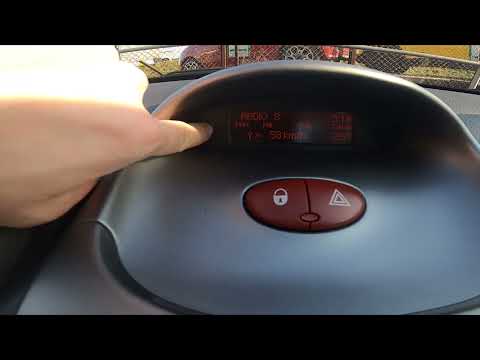 Peugeot 206 (1998-2012 / MK 1)
How to change the temperature unit on the Peugeot 206 If you own a Peugeot 206 and want to change the temperature unit displayed on your dashboard, follow these steps. First, insert the key and turn on the …Read all… Posted on 20 July 2026 by ScegliAuto Cigarette lighter (2) Airbag (9) Alternator (10) Speaker (5) Shocks (3) Antenna (5) Air conditioning (2) Car stereo (11) Anti-roll bar (2) Roof rack bars (1) Battery (17) Ignition coil (3) Air vents (4) Bushings (1) Control arm (2) Transmission (10) Spark plugs (7) Glow plugs (2) Convertible top (7) Carburetor (1) Body (8) Control unit (2) Key (26) Trunk lock (1) Timing belt (22) V-belt (6) Air conditioner (2) A/C controls (5) Onboard computer (10) Checks and maintenance (56) Dashboard (3) Shifter boot (2) Bearing (2) Brake rotors (2) Side marker light (1) Headlight (24) Tail light (6) Fog lights (6) Air filter (16) Cabin air filter (8) Fuel filter (5) Diesel fuel filter (11) Oil filter (9) Parking brake (3) Clutch (10) Grille (1) Fuel injectors (7) Reverse light switch (1) Accessory kit (1) Light bulb (7) Side marker bulb (1) Headlight bulb (24) Tail light bulb (12) Interior dome light bulb (6) Antifreeze coolant (2) Instrument panel light (15) License plate light (4) (1) Handle (1) Exhaust muffler (1) Trim cover (1) Engine (1) Power window motor (1) Starter motor (10) Transmission fluid (4) Brake fluid (1) Engine oil (9) Clock (17) Door trim panel (28) Front bumper (5) Rear bumper (4) Brake pads (4) Hydraulic pistons (1) Tires (2) Shift knob (14) Pump (8) Fuel pump (14) Car door (7) Push button (2) Power window switch (4) Instrument cluster (10) Radiator (6) Heater core (8) Wheel (4) Fuse box (58) Seat (14) Axle shaft (1) Crankshaft position sensor (1) Engine coolant temperature sensor (4) Parking sensors (1) Door lock (3) Brake system (1) Suspension system (3) Side mirror (16) Rearview mirror (3) Warning light – error code (16) Service warning light (38) Windshield wipers (3) Thermostat (2) Cylinder head (5) Tie rods (2) Center console tunnel (2) Valve (2) EGR valve (1) Blower motor (7) Side window (1) Steering wheel (6) |
How to Connect the Cables to the Battery of the Citroen Xsara Picasso?
In this tutorial, you will see how to connect the cables to the battery of the Citroen Xsara Picasso, useful if you need to recharge it or perform an emergency start. First, ensure the key is not inserted, then open the bonnet and move to the front of the left headlamp. Next, locate the bolt just behind the filter box and connect the positive terminal clamp to it. Now you can connect the negative terminal to any point on the chassis, such as the indicated point. Once the operation is complete, ensure you disconnect the negative first and then the positive. by ScegliAuto More videos
|
|
For advertising on this site Write to info@scegliauto.com
ScegliAuto is not responsible for any inaccuracy of the data in the lists. To report any inaccuracy or your business (if you own the business in question), please write to info@scegliauto.com
Number of seconds to generate the page: 0.017
(c) ScegliAuto 2026 - info@scegliauto.com - Privacy policy VAT number: IT01247470535 |
